GPT Image 2.6 Adds GIF and API Markup, with a Caveat on Text
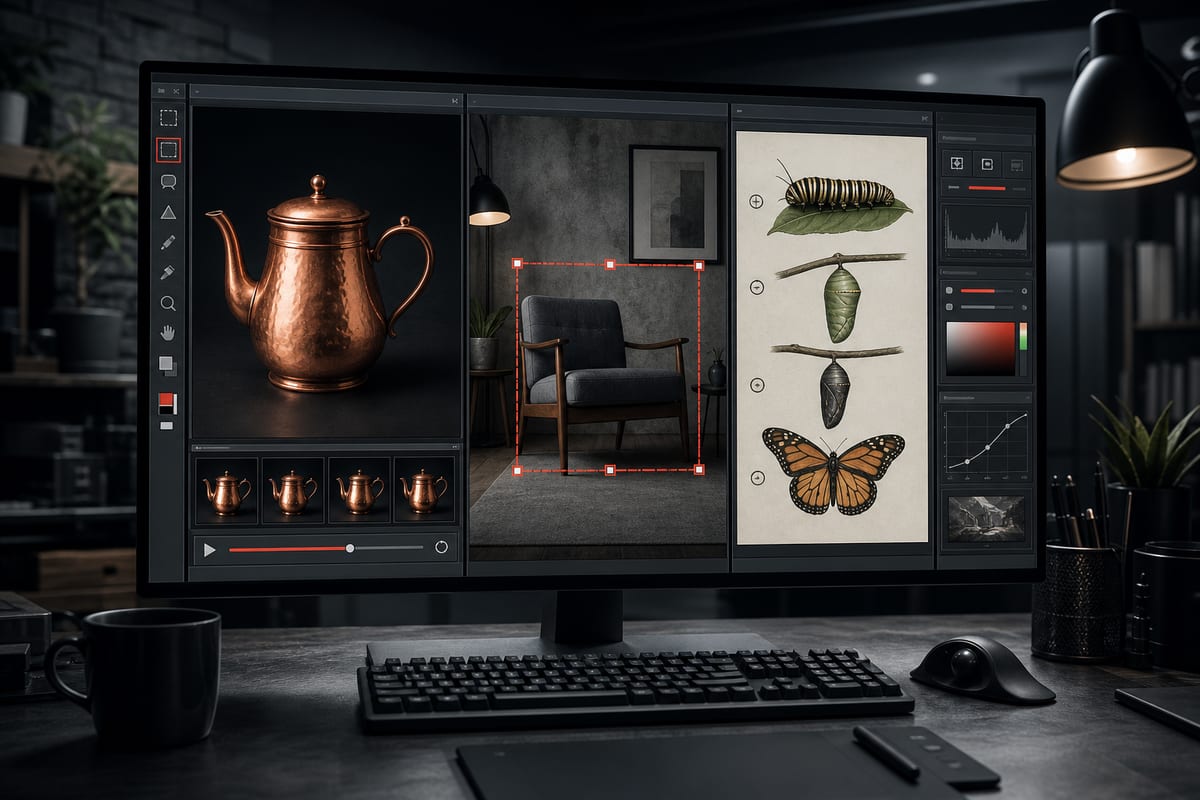
OpenAI pushes GPT Image 2.6 with native animated GIFs, markup-guided editing via API, and scheduling adjustments for developers. Tests show promising results in creation and editing but remind that exact text reproduction is not guaranteed and some features remain limited to the API.
Text fidelity and browser framework remain to be monitored
Trials indicate that GPT Image 2.6 does not reliably reproduce every character of text. In a generated menu, words and prices were preserved, but five required dashes were omitted. On the motion side, a test in the browser produced a genuine 12-frame GIF with a 2.16-second loop. The SVG function is documented as an API workflow and has not been tested in the described browser. Beyond text, minor errors in object boundaries and visual accuracy have been observed. Using a PDF as a brief activates the document-image flow of ChatGPT, without proving native PDF support by the image model. A separate comparison with Nano Banana is mentioned as another performance perspective.
What the update makes possible for developers
The new version introduces the creation of animated GIFs, integrated into the generation flow. Image markup already available in ChatGPT is now accessible via the API, and adjustable scheduling complexity is offered to developers. The basic interaction remains unchanged from GPT Image 2: describe the outcome, attach a reference if helpful, and specify what should remain unchanged. For localized editing, the markup can rely on a Rectangle tool to delineate the area to be modified, structuring the request and limiting the impact on the rest of the image.
Le brief IA que les pros lisent chaque soir
Les 7 actus IA du jour, décryptées en 5 min. Gratuit.
Inclus dès l'inscription : notre sélection des meilleurs guides & comparatifs IA.
Choisissez votre rythme
Gratuit · Pas de spam · Désabonnement en 1 clic
Five tested use cases, from editorial photography to looping GIFs
Five creative tasks were conducted to test the update. The first test aimed at a cinematic editorial photograph, focusing on the consistency of glass, condensation, snow, plants, and warm indoor lighting. A second test used a one-page PDF as a brief to accurately reproduce menu lines, prices, punctuation, and a Hindi glyph, the document containing nine lines and five prices. A third test utilized markup to edit a room: the red rectangle outlined an armchair, with only the fabric to be changed to forest green velvet, preserving the silhouette, seams, legs, position, size, and other elements of the scene. A fourth test focused on creating a natural history board dedicated to the monarch butterfly, strictly including four phases and four captions, arranged clockwise, with discreet arrows and proportions respecting biological reality. The fifth test involved creating a looping animated GIF depicting a teapot, without including text, logos, characters, cuts, camera effects, or flickers, and without using Python or any other programming language. All test results were to remain devoid of any personal data or identifiable elements.
Observed results: solid execution, residual errors
The generated menu was described as professional and compliant with the brief. The editing of the armchair appeared sufficiently precise that it was difficult to identify without the original. The scientific board produced a clean layout suitable for describing metamorphosis, and the teapot GIF delivered a smooth loop in line with the intent. Overall, the trials highlight successful creative compositions, effective markup-guided editing, and validated GIF generation. The greenhouse scene stood out visually, and the modification of the chair illustrates the value of detailed instructions. Residual errors in text and visual accuracy remain, and the overall presentation is deemed promising for creation and editing, pending verification of outputs.
The promise of speed remains a launch statement
OpenAI claims that image generation is 50% faster with this version. This promise is mentioned as a launch assertion, without support from a controlled speed comparison in the described trials.
Brief IA — L'actualité IA en français
L'essentiel de l'actualité de l'intelligence artificielle, décrypté et expliqué chaque jour.