AI for Developers and Tech Teams: The 2026 Reference Guide

According to the initial results of JetBrains' Developer Ecosystem Survey 2026, about 90% of professional developers use coding AI agents at work at least once a week, and 68% use them daily. The topic is no longer isolated experimentation but rather the organization of software work around assistants, agents, automated reviews, and safeguards. This guide details the effective uses, tool families, rules to follow, pitfalls to avoid, and a plan to get started without compromising code quality.
What AI Really Changes for Developers and Tech Teams
Code assistants are no longer limited to autocompletion. Cursor edits multiple files, Claude Code operates from the terminal, and GitHub Copilot integrates into repositories and pull requests. In our analysis on the reshaping of technical teams, the most noticeable change is organizational: the developer writes fewer lines from scratch but must better frame the task, review the agent's choices, verify tests, and decide what can be merged.
The role of senior developers is strengthening. Recent news surrounding David Heinemeier Hansson reminds us that experienced engineers at 37signals are deemed more capable of assessing the reliability of AI-generated code. For a tech team, this advocates for pairings where juniors learn to query the tool, while seniors define conventions, usage limits, review criteria, and cases where automation should stop.
Productivity depends less on the isolated tool than on the work system. Effective practices stem from a well-documented repository, a context file, actionable tests, and a tracked review. An agent that reads a ticket, modifies several files, and executes a command adds value only if the team knows how to compare the expected result, measure side effects, and reject a modification that is too opaque.
 Engineers reviewing a test list in a software team.
AI accelerates coding, but the proof lies in tests and human review.
Effective Uses Today
The most robust uses are those that maintain a short loop between request, modification, testing, and review. More advanced uses require strict framing, as the agent acts on multiple files or tasks in parallel.
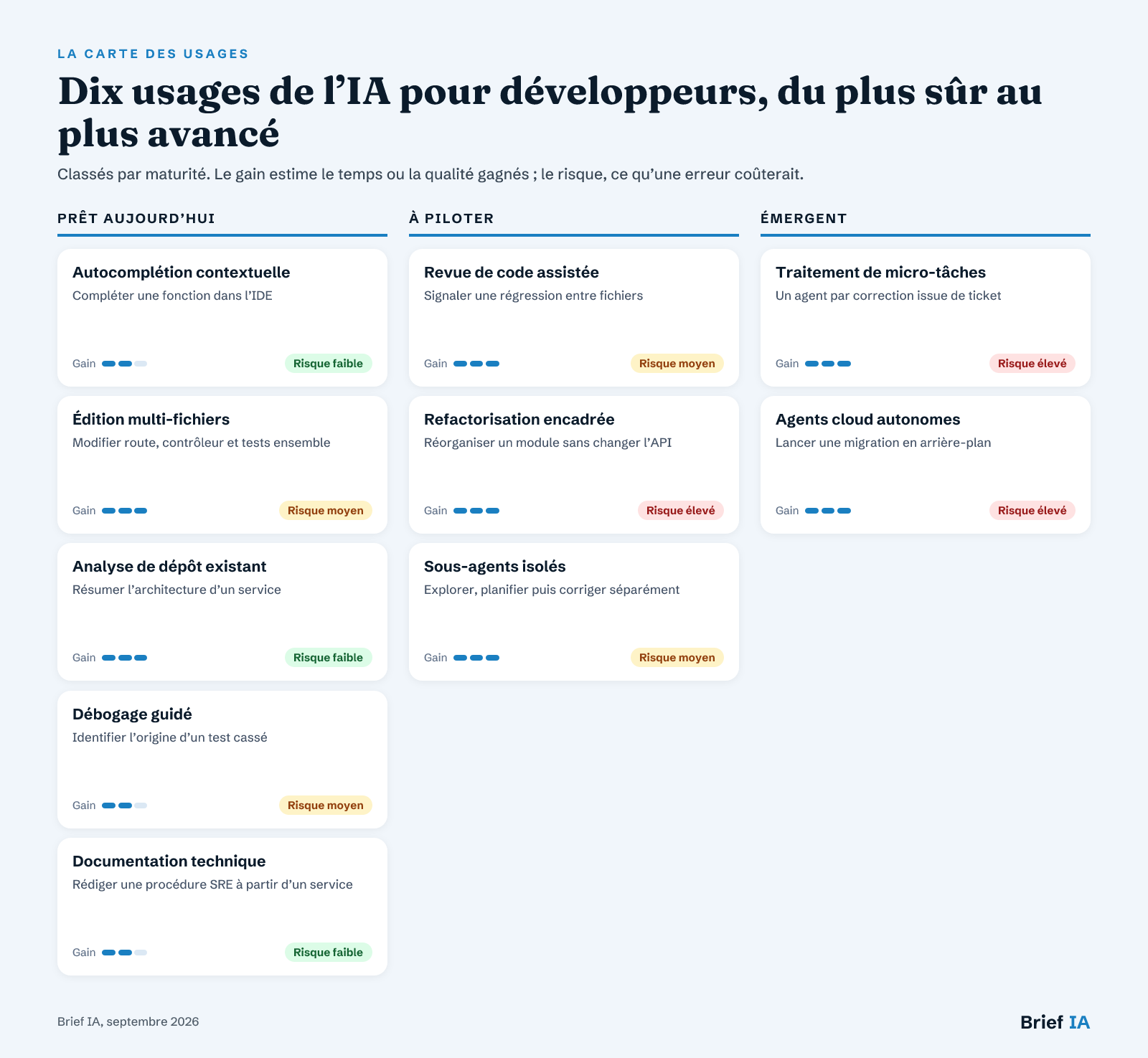 Map of AI uses for developers and tech teams
Uses classified by maturity, with expected gains and risks in case of error.
Ready-to-Use Applications
Contextual Autocompletion. AI-assisted autocompletion remains the simplest entry point. It helps write common functions, unit tests, or syntax adaptations without changing the workflow. The main risk comes from suggestions accepted too quickly. The operational rule is simple: limit use to well-understood areas, keep automatic checks active, and reject blocks that the team cannot maintain.
Multi-File Editing. Cursor and other AI-oriented IDEs can modify multiple files from a single instruction. This is useful for adding an API endpoint, renaming a component, or aligning an interface with its tests. The team must enforce readable diffs, file-by-file reviews, and limited changes. The more layers a modification crosses, the more human verification should focus on behavior, not just style.
Analysis of Existing Repositories. Asking AI to explain a codebase before any modification reduces integration back-and-forth. The /init command from Claude Code analyzes the project and creates a CLAUDE.md file, but our article on getting started with Claude Code reminds us that it often needs manual adjustment. This file becomes useful if it documents conventions, sensitive areas, and test commands.
Guided Debugging. An assistant capable of reading traces, executing tests, and proposing fixes accelerates repetitive investigations. However, it is essential to separate diagnosis from correction. The best practice is to first ask for hypotheses, then the commands to run, and only then a proposed fix. This avoids the agent masking the root cause with a too-quick local modification.
Technical Documentation. AI produces good drafts of operating procedures, architectural comments, and operational guides when it starts from real code and commands. This use is particularly relevant for harmonizing repetitive documents. Each command must be verified, unproven assumptions removed, and documentation linked to specific services. Generated documentation should not become a layer of fiction around the system.
Uses to Manage
Assisted Code Review. Automated review can spot inconsistencies, missed tests, and defects across multiple files. In our analysis of code review tools, Qodo and Claude Code stand out in scenarios where context exceeds the diff. The team must measure false positives, maintain mandatory human review, and distinguish blocking comments from comfort suggestions.
Framed Refactoring. Agents are useful for repetitive refactorings, but the risk increases quickly once they touch architecture. A non-regression instruction must be provided, a plan requested before execution, the scope limited, and tests verified to cover critical paths. A generated refactor must remain divisible into readable steps; otherwise, the team loses the ability to understand the real impact.
Isolated Sub-Agents. Sub-agents allow for isolating exploration, planning, and execution to avoid context pollution from long sessions. Our article on Claude Code sub-agents describes the benefit of separate context windows that summarize their conclusions. To be managed on complex tasks, with a short final report and test evidence before merging.
Emerging Uses
Micro-Task Processing. Developers describe pipelines where Claude Code handles numerous micro-requests in separate work trees, with an HTML verification report. This approach can speed up the produced flow but concentrates risks: ticket ambiguities, duplicated efforts, superficial tests. It should remain reserved for well-defined corrections, with an explicit validation queue and automatic rejection of untestable changes.
Autonomous Cloud Agents. Cursor 3, launched on April 2, 2026, illustrates the shift towards agents capable of executing longer tasks and documenting their actions. In our analysis of Cursor AI in enterprises, Amplitude is cited for deploying three times more code into production with Cursor. This type of use requires strong governance: minimal rights, logs, tests, and human approval.
Tools to Know
There is no universal ranking: teams must choose by tool family, according to their environment, risk tolerance, and need for control.
- IDE Integrated Assistants. GitHub Copilot, Cursor, and Windsurf integrate into daily development, with significant differences between extensions, specialized editors, and multi-file editing. The criteria are detailed in our analysis of Copilot, Cursor, and Windsurf. Requirements: rights management, exclusion of sensitive repositories, readable diffs, team settings.
- Terminal Agents. Claude Code operates from the terminal, reads the file system, edits files, and can execute commands with approval. It suits teams that want to maintain a local experience and detailed review of actions. Requirements: confirmation before command, execution log, maintained project context, easy stop.
- Cloud Agents and Asynchronous Tasks. Codex and some cloud agents prioritize autonomy, speed, and parallelizable tasks. Our analysis of Claude Code versus Codex shows that the choice depends as much on cost per task as on perceived code quality. Requirements: environment isolation, scope limits, evidence feedback, access revocation.
- Automated Review Tools. Qodo, CodeRabbit, Claude Code, or Copilot can comment on a pull request, look for defects, and link multiple files. They should complement human review, not replace it. Requirements: low noise, configurable rules, links to files, distinction between blocking and suggestion.
- Business Connectors and MCP. Connectors and MCP servers provide context to agents: tickets, observability, repositories, documentation, or specialized tools. Unity has released official plugins for Claude Code and OpenAI Codex compatible with Unity 6. Requirements: documented scope, minimal access, traceability, connector updates.
Le brief IA que les pros lisent chaque soir
Les 7 actus IA du jour, décryptées en 5 min. Gratuit.
Inclus dès l'inscription : notre sélection des meilleurs guides & comparatifs IA.
Choisissez votre rythme
Gratuit · Pas de spam · Désabonnement en 1 clic
The Framework: AI Act, GDPR, Data, Cybersecurity, and Responsibility
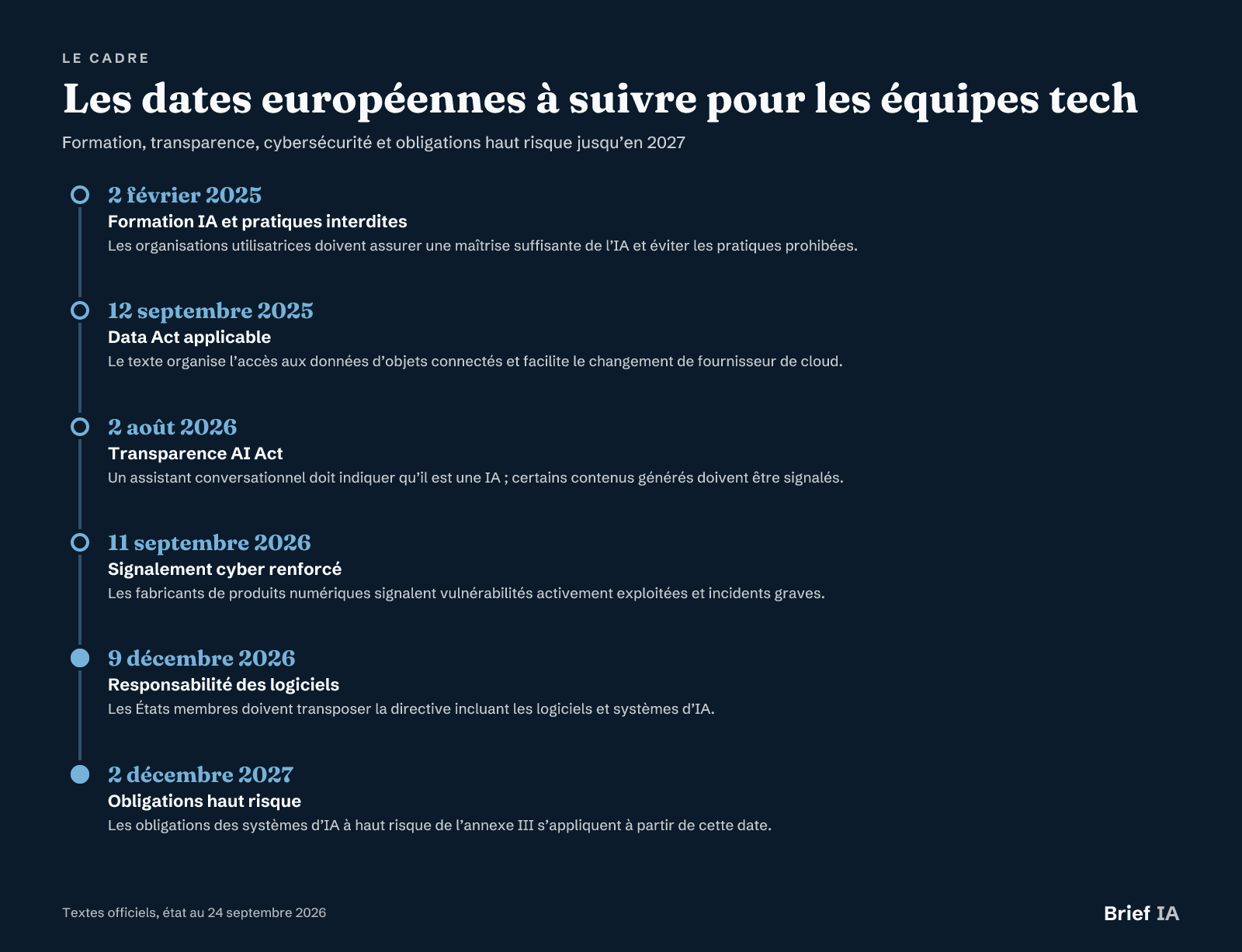 Key European dates for tech teams
Key dates, status as of September 24, 2026.
AI Act in Daily Life
The AI Act came into effect on August 1, 2024, and applies in phases. Since February 2, 2025, prohibited practices are banned, and any organization using AI systems must ensure a sufficient level of AI mastery among its staff. For a tech team, this requires training users of assistants and agents. Since August 2, 2026, transparency obligations apply: a conversational assistant must indicate that it is AI, and certain generated content must be flagged.
High Risk, Not Yet
High-risk AI systems in Annex III cover education, employment, critical infrastructure, policing, migration, justice, and certain essential services. After the Digital Omnibus, their obligations will apply starting December 2, 2027. The obligations for AI integrated into already regulated products in Annex I will apply starting August 2, 2028. Writing, summarizing, accounting, cash flow forecasting, or fraud detection tools, when not used in high-risk contexts, are not considered high-risk systems.
GDPR and Automated Decisions
The GDPR has been in effect since May 25, 2018. Its Article 22 governs decisions based solely on automated processing that produce legal or significant effects on a person. A tech team must therefore identify modules that influence individuals, document the level of automation, and plan for human intervention when the process requires it. Logs, datasets, and explanations are not only useful for developers; they also secure the system's operation.
Software, Products, and Cybersecurity
The Data Act has been in effect since September 12, 2025, facilitating cloud provider switching. Since September 11, 2026, the Cyber Resilience Act requires manufacturers of products with digital elements to report actively exploited vulnerabilities and serious incidents, with alerts within 24 hours and notifications within 72 hours. The directive on liability for defective products includes software, including AI systems, and must be transposed by December 9, 2026, at the latest.
Pitfalls to Avoid
Accepting Without Understanding. The apparent gain disappears if the team merges code it cannot explain. Each generated change must be reviewable, testable, and maintainable by a responsible developer. The criterion is not whether the AI is correct, but whether the team can prove it.
Providing Too Much Context. The more an agent receives deposits, tickets, and documents, the more useful it becomes, but the greater the risk of leaks or confusion. Access must be limited, work branches isolated, and unnecessary information removed before opening a long session.
Confusing Speed with Quality. An agent can quickly produce a plausible fix. This does not guarantee architectural consistency, security, or stability in production. Metrics to track are regressions, review feedback, incidents, and maintenance time, not just code volume.
Overengineering the Tools. Some tasks are simply about completion, while others require a planned agent. Imposing a complex infrastructure for every fix slows down the team. Levels of use should be defined: lightweight assistant, framed agent, advanced automation with enhanced validation.
Forgetting Social Dialogue. Labor law stipulates that the CSE must be informed and consulted when introducing new technologies in the company. Tech teams must anticipate this point when assistants modify work organization, task monitoring, or expected skills.
Taking Action: The 90-Day Plan
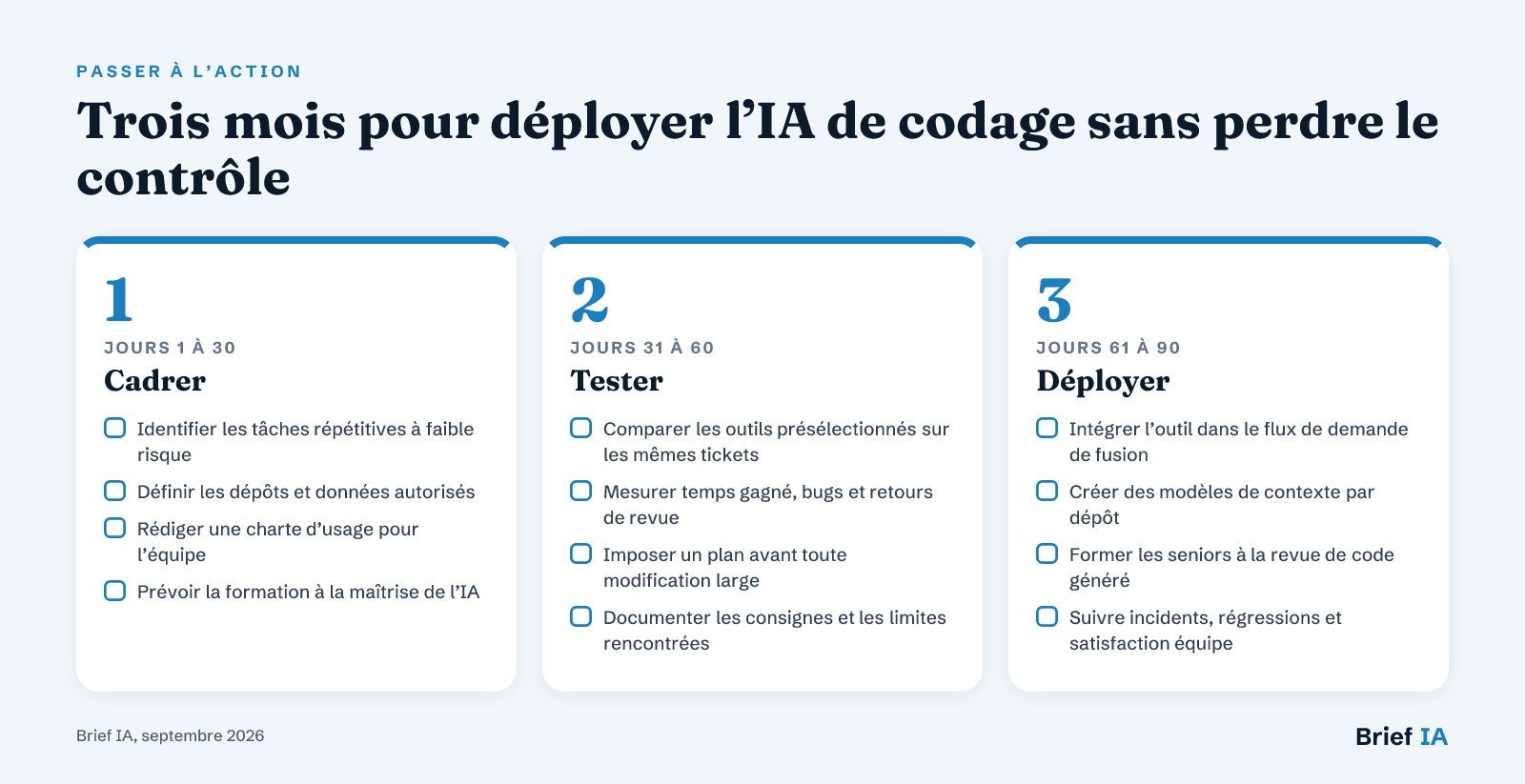 Three months to deploy coding AI without losing control
Three steps: frame, test, deploy.
Start with a simple, measurable, and low-risk case: repository documentation, test generation, or assisted review. The first month is for framing rules, access, and authorized repositories. The second month tests the preselected tools on the same workflow. The third month deploys only proven uses, with quality indicators, internal training, and a stop procedure.
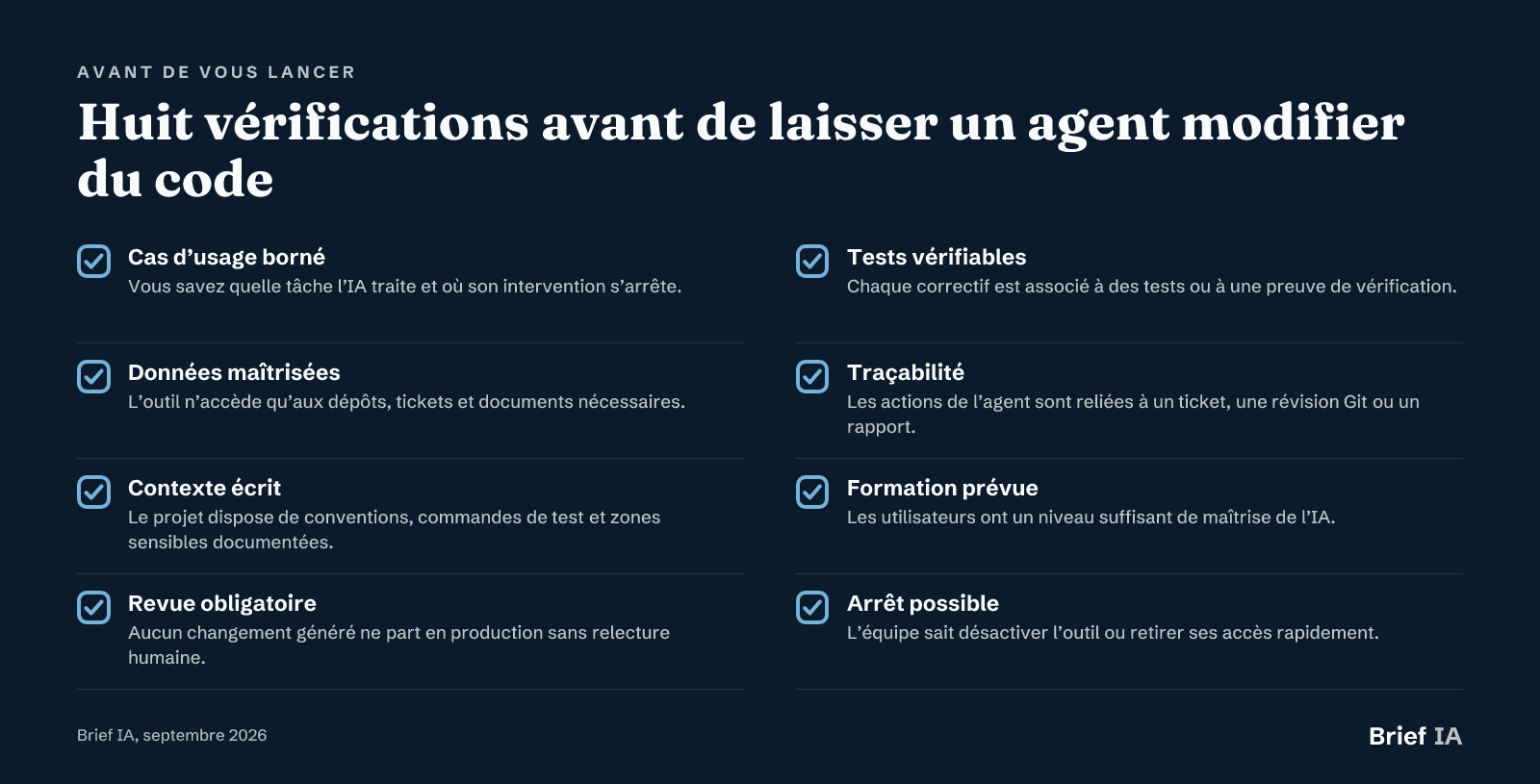 Eight checks before allowing an agent to modify code
Eight checks to perform before each new use.
For Further Reading
Our analyses for developers and tech teams
- How coding AI reshapes technical teams. Understand the impact of assistants and agents on roles, reviews, juniors, and the place of seniors.
- Copilot, Cursor, or Claude Code: choosing based on your workflow. Compare IDE extension approaches, AI-oriented editors, and terminal agents to equip a team.
- Five tools to automate part of code review. See how Qodo, Claude Code, Cursor, Copilot, and CodeRabbit position themselves on review quality.
- Claude Code versus Codex: quality, autonomy, and cost per task. Decide between local work, cloud automation, benchmarks, and usage costs based on tasks.
- Deploying Cursor AI in a tech organization. Analyze agent uses, governance, and Amplitude's example with Cursor.
- Automating development with Claude Code. Configure Claude Code, analyze a repository, modify files, and frame executed commands.
Key News to Remember
- Claude Code: use /init to create a project context
- Boris Cherny shares 15 tips for better leveraging Claude Code
- Seven slash commands to customize Claude Code sessions
- Claude Code: sub-agents isolate long sessions
- A Claude Code pipeline to handle micro-tasks in series
- Unity releases official plugins for Codex and Claude Code
Are you editing a solution for developers and tech teams?
This guide is read by developers, CTOs, tech leads, DevOps managers, and product teams. Brief IA offers tool developers, DevOps platforms, and AI governance solutions dedicated articles, evening brief inserts, and promotion in the directory. Formats and rates at briefia.fr/partenaires.
The Essentials in Questions
Which AI to Choose for Team Coding in 2026?
The choice depends on the workflow. GitHub Copilot suits teams already focused on GitHub and the existing IDE. Cursor is suitable for multi-file editing in an AI-oriented editor. Claude Code is relevant for terminal teams, refactorings, and repository analysis. The right test is to compare preselected tools on the same tickets and review criteria.
Can AI Replace Code Review?
No. It can prepare the review, flag inconsistencies, and help link multiple files, but it does not replace a developer's responsibility. David Heinemeier Hansson emphasizes that senior developers are better positioned to spot errors in AI-generated code. A generated pull request must still be reviewed, tested, and explained.
How to Use Claude Code Without Losing Control?
Start with repository analysis and project context creation, then request a plan before modifications. Commands must be approved, changes limited, and tests executed. For long sessions, sub-agents help separate exploration, planning, and correction. The CLAUDE.md file must be reviewed and completed by the team.
Are Code Assistants High-Risk Systems Under the AI Act?
An AI tool without high-risk use is not a high-risk system. Examples include writing, summarizing, accounting, cash flow forecasting, and fraud detection. For a coding assistant, the actual use must be qualified: if the system serves a domain listed in Annex III, the high-risk timeline applies starting December 2, 2027.
What Rules to Set Before Deploying a Coding Agent?
Define accessible repositories, prohibited data, actions requiring approval, and review criteria. Each task must be linked to a ticket, a Git review, or a report. Broad changes should be broken down. The team should also plan user training, action logs, and a procedure for quickly cutting access.
Brief IA — L'actualité IA en français
L'essentiel de l'actualité de l'intelligence artificielle, décrypté et expliqué chaque jour.