AI and Workplace Productivity: The 2026 Reference Guide

M&T Bank has already equipped about 16,000 employees out of 22,000 with AI copilots, connected to 1,800 business applications and internal systems. This case illustrates the real issue for office teams: AI is valuable not for its hype but for its integration into emails, meetings, documents, spreadsheets, and daily processes. The benefits arise when usage is targeted, trained, and governed. This guide details the effective uses, tool families, rules to follow, pitfalls to avoid, and a plan to get started.
What AI Really Changes in Office Productivity
AI primarily shortens the microtasks that fragment the day: summarizing an email thread, preparing a report, rephrasing a note, transforming notes into an action plan. Our analysis on AI assistants for administrative tasks highlights promises of reducing the time spent on these activities by 30% to 50%, but the outcome depends on the work environment. An isolated assistant helps occasionally; an assistant integrated into files, meetings, and messages truly reduces attention breaks.
The most concrete change relates to collective working memory. In Teams, Meet, Notion, or document spaces, assistants produce summaries, extract decisions, and propose tasks. The value does not come from a raw automatic report but from its transformation into reliable follow-up: responsible party, deadline, dependencies, reference document. Without naming rules, access rights, and validation, AI struggles to find the right context and can amplify existing disorder.
Method matters more than simply purchasing a subscription. Our analysis on transforming professional daily life with AI recommends starting with a single recurring task, measuring the time saved, and then expanding. This approach avoids scattered testing. It also requires clarifying instructions: context, expected role, output format, and constraints. A well-shared prompt often holds more value than an additional poorly adopted tool.
 Team reviewing meeting notes in a bright office in Nantes
AI prepares the draft; the team retains decision validation.
Effective Uses Today
The following uses are not equal. The most reliable ones focus on text, meetings, and documents already produced by the team; the most sensitive involve decisions, access, and automation.
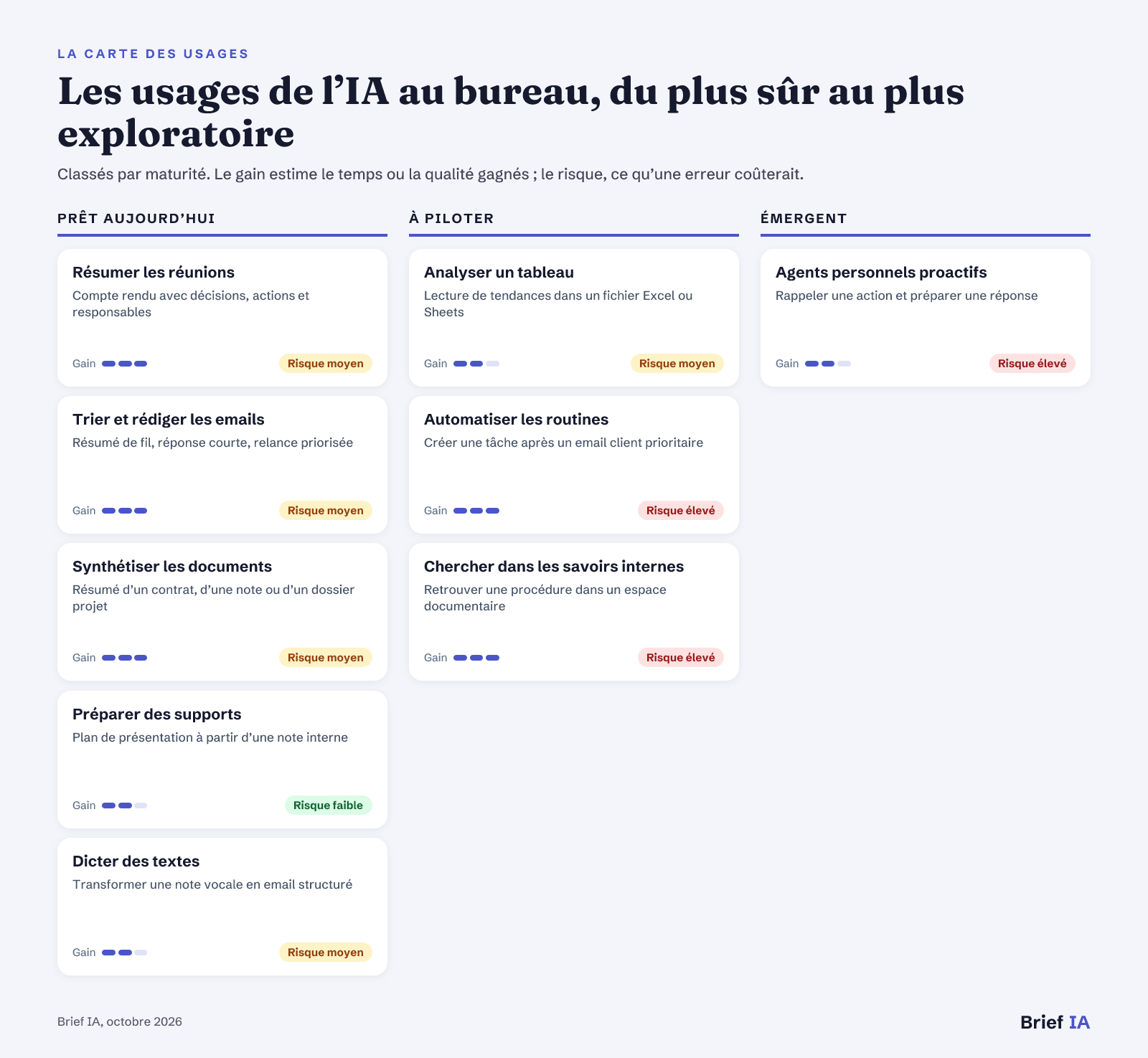 Map of AI uses for corporate teams
Uses classified by maturity, with expected gain and risk in case of error.
Ready-to-Use Applications
Summarizing Meetings. Meeting assistants transform a transcription into a summary, decisions, and tasks. In Google Meet, Gemini can generate summaries and take assisted notes, according to our analysis on Gemini in Google Meet. The best practice is to produce a draft and then have the decisions validated by the facilitator. Confidential topics require clear rules for recording, access, and retention.
Sorting and Composing Emails. Assistants integrated into Gmail and Outlook summarize long conversations, suggest replies, and help prioritize messages. Our analysis on Gmail and Outlook for email sorting shows that the difference mainly lies in the already used ecosystem. The risk involves tone, recipients, and attachments: no sensitive response should be sent without human review.
Synthesizing Documents. Generalist or office assistants reduce the time spent reading a long document, comparing versions, or producing a summary note. The use is solid for preparing an initial reading, extracting points of attention, or rephrasing text. It remains necessary to verify citations, figures, clauses, and decisions. AI facilitates understanding; it does not replace the signatory's responsibility.
Preparing Materials. Word, Docs, PowerPoint, Slides, and generalist assistants can transform a brief into a plan, draft, or meeting material. The interest is strong at the beginning of the work when the team seeks a structure. To avoid generic materials, provide the audience, objective, length constraints, and key messages to retain. The final version should always be produced by someone who understands the business context.
Dictating Texts. AI dictation applications correct hesitations, punctuate, and adapt the text to the context. Wispr Flow, Willow, and Monologue are among the solutions mentioned in recent news, with different approaches to personalization and privacy. In an open office, the barrier is as much social as it is technical: plan for suitable areas, headsets, and rules to avoid dictating sensitive information within earshot.
Uses to Manage
Analyzing a Spreadsheet. AI can help formulate questions about a spreadsheet, generate formulas, spot anomalies, and prepare a management comment. The gain depends on data quality and understanding of the columns. Before using it in reporting, impose a test set: same data, same question, comparison with manual calculation. Financial, commercial, or HR results must be traceable.
Automating Routines. Automation tools and agents can link emails, spreadsheets, CRMs, messaging, and task management. The useful case is a stable routine, with a clear trigger and verifiable output. Start with an action that prepares a draft or creates a task, rather than an automatic send. Errors multiply when the agent has broad access, numerous exceptions, and insufficient validation.
Searching Internal Knowledge. An assistant connected to internal documents can find a procedure, summarize a policy, or direct to the right file. The gain is real if access rights are properly managed. Before deployment, ensure that the tool does not reveal contracts, employee data, or financial information to unauthorized individuals. An intelligent search engine immediately exposes weaknesses in document governance.
Emerging Uses
Proactive Personal Agents. Proactive personal agents aim to anticipate needs, connect messages, calendars, and documents, and then propose actions. The use remains exploratory for the company. Before any testing, limit access, prohibit payments and autonomous sends, and require an action log. The right initial scope is assistance in preparation: reminders, drafts, summaries, and checklists, never an unreviewed decision.
Tools to Know
There is no universal ranking: the right choice depends on the ecosystem, accessible data, level of control, and business risk.
- Integrated Office Assistants. Microsoft 365 Copilot, Google Gemini in Workspace, and Notion AI bring AI where teams write, organize, and meet. Our analysis on M&T Bank and AI industrialization shows the value of deployment within existing tools. Requirements: unchanged access rights, usage logs, centralized administration, brief training.
- Generalist Writing and Analysis Assistants. ChatGPT, Claude, or Gemini are used for writing, rephrasing, synthesizing, and preparing ideas when work does not depend on a single office suite. They are well-suited for testing, provided no confidential data is deposited without a validated framework. Requirements: enterprise version for sensitive data, history control, possible export, privacy rules.
- Meeting and Note Assistants. These tools transcribe, summarize, and transform a meeting into actions. They should be evaluated on summary quality, but also on consent, retention of transcriptions, and ability to correct the report. Requirements: informing participants, controlled deletion, defined storage, human validation.
- Automation Platforms and Agents. They create automated processes from a natural language description or demonstration. The first use should prepare an action, not execute it without control, especially when it involves clients, payments, HR, or financial data. Requirements: draft mode, mandatory approval, access limits, action history.
- Dictation Tools and Personal Devices. Wispr Flow, Willow, Monologue, or Bee illustrate the rise of voice and portable interfaces. Their value depends on audio confidentiality, text correction, and acceptability in a shared office. Requirements: local processing or audio deletion, encryption, business vocabulary, simple deactivation.
Le brief IA que les pros lisent chaque soir
Les 7 actus IA du jour, décryptées en 5 min. Gratuit.
Inclus dès l'inscription : notre sélection des meilleurs guides & comparatifs IA.
Choisissez votre rythme
Gratuit · Pas de spam · Désabonnement en 1 clic
The Framework: AI Act, GDPR, CSE, and Office Data
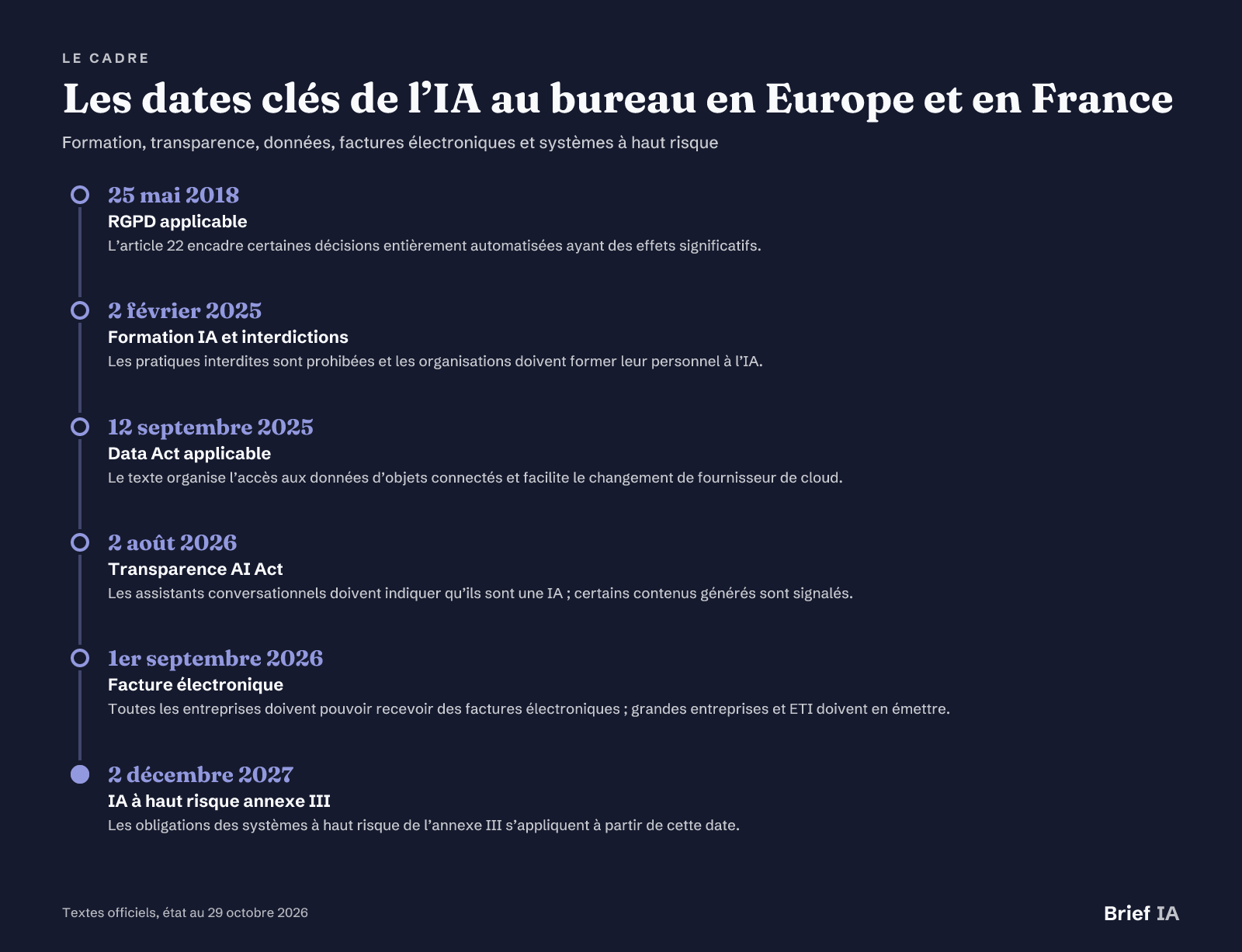 Key dates for AI in the office in Europe and France
Key dates, status as of October 29, 2026.
AI Act in Daily Life
The AI Act came into effect on August 1, 2024, and is being implemented in phases. Since February 2, 2025, prohibited practices are banned, and any organization using AI systems must ensure a sufficient level of AI mastery among its personnel. Since August 2, 2026, transparency obligations apply: a conversational assistant must indicate that it is AI, and certain generated content must be labeled as such.
High-Risk Uses
Writing, summarization, accounting, cash flow forecasting, or fraud detection tools without high-risk use are not considered high-risk systems. However, employment falls under Annex III when AI is used for recruitment, selection, promotion, dismissal, task allocation, evaluation, or monitoring of employees. Following the Digital Omnibus, the obligations for these high-risk systems will apply from December 2, 2027.
Personal Data and Employees
The GDPR has been in effect since May 25, 2018. Its Article 22 regulates decisions based solely on automated processing that produces legal or significant effects on a person. In the company, the CSE is informed and consulted when introducing new technologies. For a productivity assistant, this requires documenting purposes, processed data, access, retention duration, and the role of human decision-making.
Cloud, Invoices, and Sanctions
Since September 12, 2025, the Data Act facilitates, among other things, changing cloud providers. Since September 1, 2026, all companies must be able to receive electronic invoices, while large companies and mid-sized enterprises must issue them through an approved platform. SMEs and microenterprises will have to issue them starting September 1, 2027. Sanctions under the AI Act can reach €35 million or 7% of global annual revenue for prohibited practices, and €15 million or 3% for other obligations.
Pitfalls to Avoid
Sensitive Copy-Pasting. Pasting a contract, client file, or employee data into an unvalidated assistant creates an immediate risk. Prohibit confidential data in public tools and provide anonymized examples for prompt learning.
Poorly Managed Access Rights. An assistant connected to a document space should not reveal more than the user is authorized to view. Before the pilot, check groups, public shares, inherited folders, and forgotten sensitive files.
Automating Too Quickly. An agent that sends, modifies, or pays without validation turns an instruction error into an operational incident. Initial scenarios should remain drafts, with human approval and an actionable log for the administrator.
Summarized Meetings, Not Decided. An automatic report gives an impression of control. However, ambiguous decisions, disagreements, and poorly identified responsible parties must be corrected. Designate a person to validate each summary before distribution.
Overly Broad Confidentiality. Proactive personal agents sometimes require extensive access. Recent news on OpenAI dots highlights the importance of fine-tuning settings. Limit calendar, messaging, payment, and files to the strict tested need.
Taking Action: The 90-Day Plan
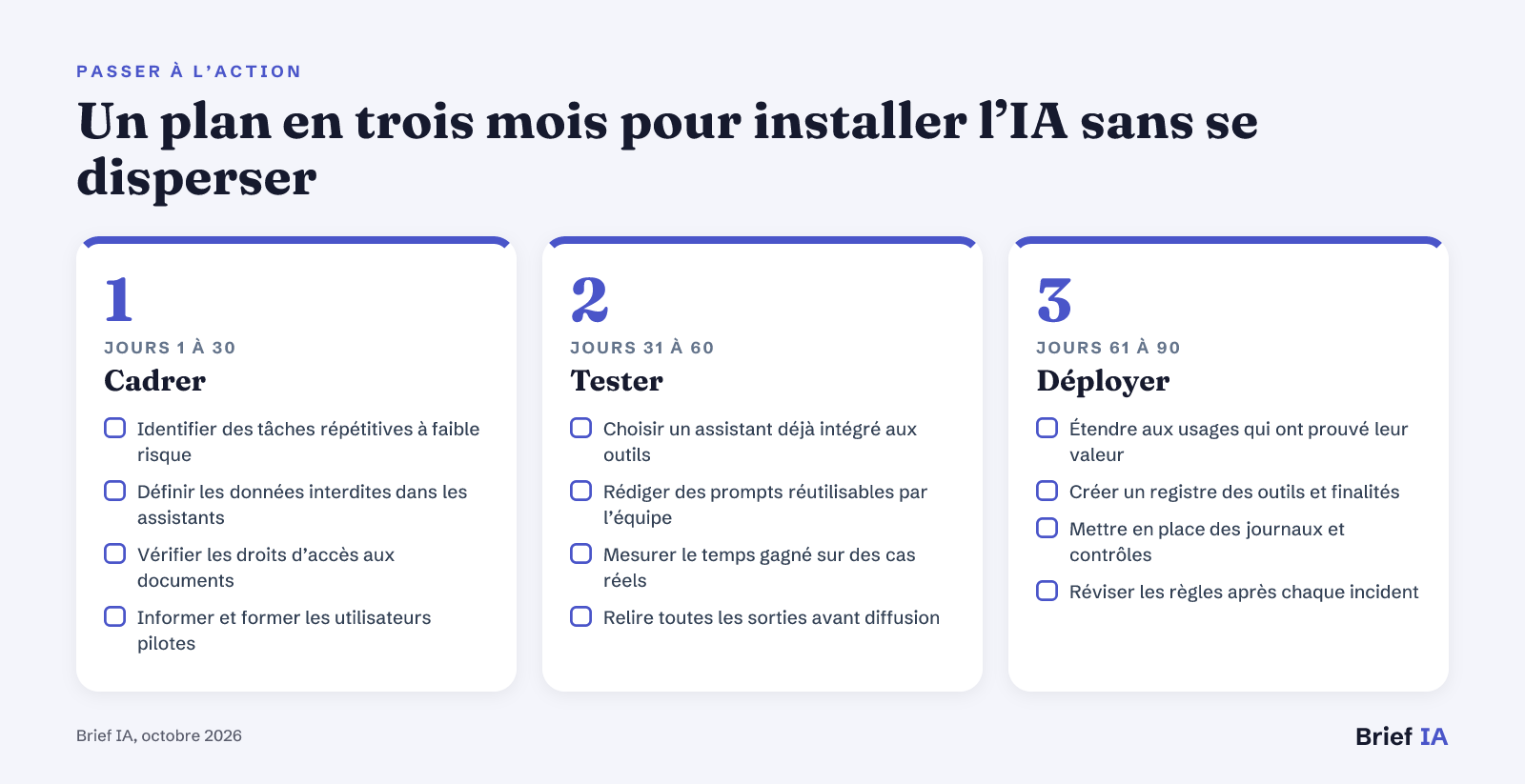 A three-month plan to implement AI without scattering
Three steps: frame, test, deploy.
Start with a simple and frequent use: emails, reports, or document summaries. The first month serves to frame the rules, choose a small group, and train on prompts. The second month measures the gain on real cases, with reviews and tracked incidents. The third month only expands validated uses, adds access administration, and prepares controlled automations.
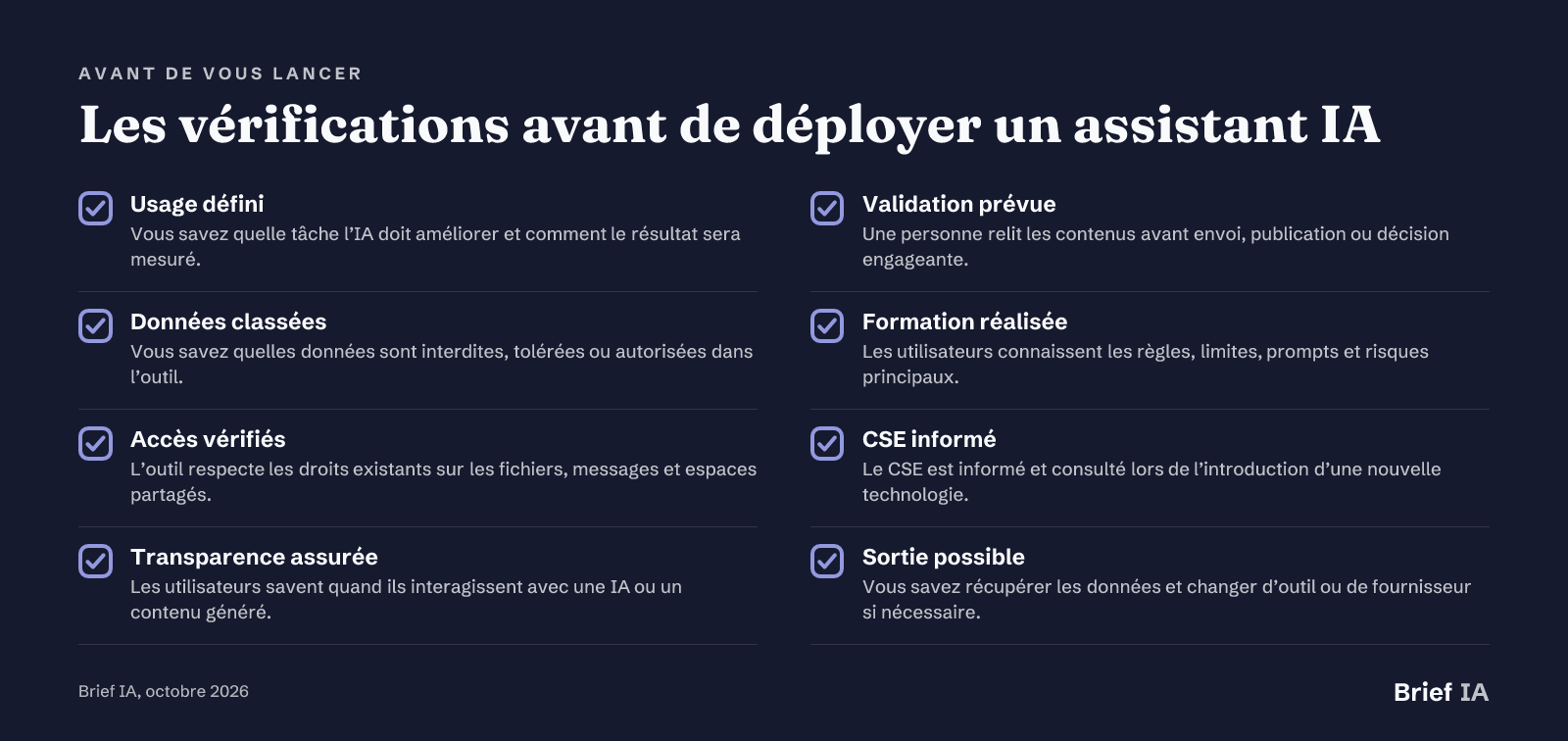 Checks before deploying an AI assistant
Eight checks to perform before each new use.
Further Reading
Our analyses for corporate teams
- Choosing an AI assistant for emails, meetings, and documents. A comparison of assistants suited for administrative tasks and points of vigilance regarding integration.
- The method for installing AI in work routines. A gradual approach to start from a recurring task, measure the gain, and avoid dispersion.
- Gmail or Outlook: organizing emails with AI. What Gemini and Copilot change in sorting, summarizing, responding, and prioritizing messages.
- Better using Gemini in Google Meet. Useful settings and uses to transform meetings into notes, summaries, and tracked actions.
- What M&T Bank's AI deployment shows. A model of industrialization with office copilots, existing applications, and internal developments.
- Notion AI, ChatGPT, or Copilot for notes. The differences between note assistants, generalist tools, and office integration.
Key News to Note
- Wispr Flow, Willow, and Monologue progress in AI dictation
- OpenAI adds Premium seats to ChatGPT Business
- Bee launches two portable AI assistants starting at $74.99
- OpenAI introduces dots, a proactive assistant starting at $100 per month
- ChatGPT adds a file library for paying subscribers
- Apple integrates AI into Shortcuts to create workflows
Are you publishing a solution for office productivity?
This guide is read by executives, managers, administrative heads, project teams, support functions, and IT directors. Brief IA offers solution publishers for productivity, collaboration, office automation, and AI governance dedicated articles, evening brief inserts, and promotion in the directory. Formats and rates at briefia.fr/partenaires.
The Essentials in Questions
Which AI to Choose to Save Time in the Office?
The right choice primarily depends on the work environment. A Microsoft team benefits from testing Copilot in Outlook, Teams, Word, and Excel. A Google team will look at Gemini in Gmail, Docs, Drive, and Meet. If uses are cross-functional, a generalist assistant may suffice for writing, rephrasing, and synthesizing, with strict rules on data.
What AI Uses Are the Safest to Start With?
The safest uses focus on low-risk text tasks: summarizing a document, rephrasing an email, preparing an agenda, drafting a report, or structuring a note. The output must always be reviewed by a person. Initially, avoid individual decisions, sensitive data, and automatic actions.
Can Confidential Data Be Placed in ChatGPT or Gemini?
No confidential data should be deposited in a tool not validated by the company. Use framed versions when sensitive documents are necessary, check history, retention, and training settings, and anonymize examples when possible. The rule should be simple, written, and known to the teams.
Can AI Draft Meeting Minutes?
Yes, assistants can produce a transcription, summary, decisions, and tasks. The automatic report should remain a draft. A person must verify decisions, correct disagreements, confirm responsible parties, and remove unnecessary confidential elements. Participants should also be aware of recording and retention rules.
What AI Act Obligations Concern a User Company?
Since February 2, 2025, an organization using AI systems must ensure a sufficient level of AI mastery among its personnel and comply with prohibitions. Since August 2, 2026, transparency obligations apply. The obligations for high-risk systems in Annex III will apply from December 2, 2027.
Brief IA — L'actualité IA en français
L'essentiel de l'actualité de l'intelligence artificielle, décrypté et expliqué chaque jour.