AI for Educators and Training: The 2026 Reference Guide

In K-12 education, a study cited during the AI Skills Jam by OpenAI Academy and the Walton Family Foundation indicates that teachers using AI save an average of 5.9 hours per week. The message is clear: tools are no longer limited to student assignments; they impact lesson preparation, support, assessment, and professional development. This guide distinguishes effective uses, tool families to consider, rules to follow, pitfalls to avoid, and a simple plan to get started.
What AI Really Changes for Teachers and Training
The first transformation concerns pedagogical rules. In higher education, the MIT ad hoc committee recommends that each course specify whether AI is prohibited, allowed, or required, with a justification related to learning objectives. This logic can inspire high schools, vocational training centers, universities, and training organizations: the same tool may be acceptable for brainstorming ideas but prohibited for producing a final answer. Our analysis on restructuring AI use in education details this course-by-course approach.
The second transformation affects teaching time. AI generates variations of exercises, reformulates instructions, creates quizzes, and helps prepare individualized feedback. The goal is not to pile on resources but to start from the need: a poorly understood concept, a heterogeneous group, a session that needs to be made more active. The AI Skills Jam initiative by OpenAI Academy and the Walton Family Foundation, described in our article on AI for K-12 educators, illustrates this shift towards practical and structured uses.
For trainers, the value shifts. Our analysis of on-demand AI platforms notes that materials, quizzes, or case studies can be produced much faster than before, while a design day in B2B can be billed between 500 and 1,200 euros in France. This differential puts margins under pressure. The answer is not to sell raw content but to sell diagnostics, contextualization, facilitation, practical application, and validation of learning outcomes.
 Trainers and learners annotating materials in a French amphitheater.
AI assists, but pedagogical judgment remains in the classroom.
Effective Uses Today
The best uses start with specific, repeatable, and verifiable tasks. The most sensitive areas involve assessment, guidance, individualized tracking, and student or learner data.
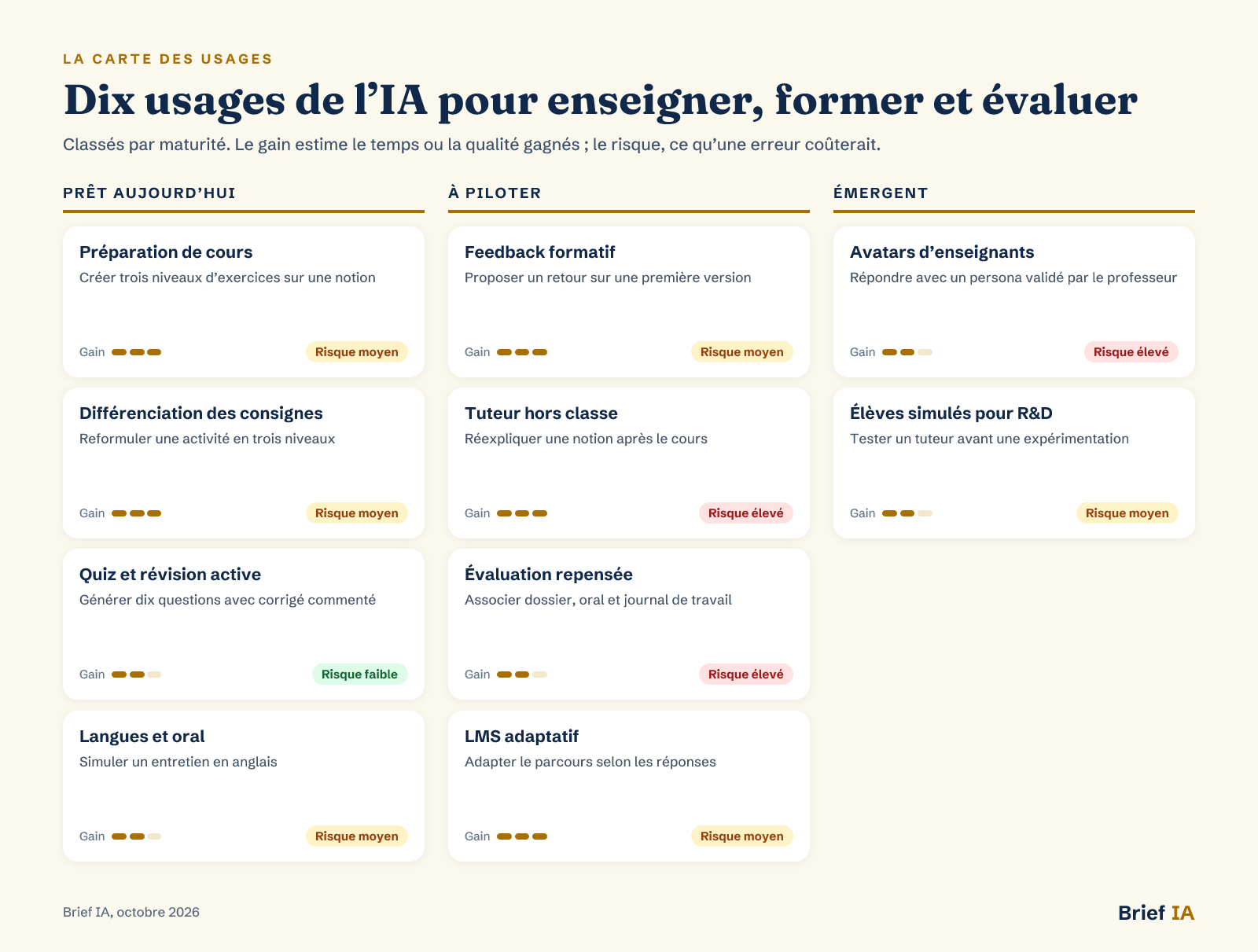 Map of AI uses for teachers and trainers
Uses classified by maturity, with expected gains and risks in case of error.
Ready-to-Use Applications
Lesson Preparation. An assistant can transform a learning objective into a lesson plan, exercise variations, case studies, differentiated instructions, and a grading rubric. MagicSchool AI, featured in our analysis on AI tools for teachers in the classroom, offers over 80 tools for this work. Human oversight remains essential: checking progress, removing incorrect examples, and adapting to the actual level of the group.
Differentiation of Instructions. AI helps produce multiple versions of the same activity: simplified instructions, more demanding variants, graduated assistance, vocabulary, additional examples. This is useful when a class or training group progresses at different speeds. Best practice is to start from a validated resource and then request limited adaptations. Final instructions should always be reviewed by the teacher, especially if they concern vulnerable students.
Quizzes and Active Revision. AI-generated quizzes serve to quickly check understanding, prepare for a review session, or transform a document into practice. They are more reliable when based on a course provided by the teacher rather than a vague request. The correct use is not to automatically grade but to identify points to revisit and have learners explain why an answer is correct or not.
Languages and Speaking. Language coaches provide more opportunities to speak, repeat, and receive immediate correction. Talkpal claims over 5 million learners and more than 80 languages, according to our analysis on language learning with AI. These tools are well-suited for individual practice. In class, it is important to specify what is allowed to prepare for speaking and what must be produced without assistance.
Uses to Monitor
Formative Feedback. AI can comment on a paper, identify gaps, suggest improvements to a plan, or pose clarification questions. The risk arises when feedback becomes a decision or a grade. Therefore, the tool should be used as a first reader, with the teacher validating the comments. For learners, asking for justification of the feedback received also fosters critical thinking.
Out-of-Class Tutor. An AI tutor can respond outside of class hours, offer hints, and direct learners to approved resources. The interest is real for repetitive questions or revisions. The risks are equally clear: incorrect answers, dependency, confusion between assistance and solution. The tutor should be limited to validated content, indicate that it is AI, and refer to an adult when a situation becomes personal or sensitive.
Reimagined Assessment. AI forces a distinction between the final product and the learning process. A written assignment can be supplemented by an oral presentation, a work journal, successive drafts, or a live demonstration. This approach reduces the focus on automatic detection, which is insufficient on its own. The rule should be simple: announce the permitted use, require declaration of assistance, and assess competencies that the tool does not replace.
Adaptive LMS. AI-powered learning platforms promise to track understanding rather than clicks. They can generate dynamic quizzes, adjust content, and offer real-time tutoring. The latest news on AI-powered LMS describes this evolution. Before deployment, it is necessary to check the data collected, the adaptation criteria, and the possibility for a trainer to regain control.
Emerging Uses
Teacher Avatars. Napster and GEMS Education announced on September 16, 2026, a partnership to test AI agents and digital personas in education, with a first phase at the GEMS School of Research and Innovation in Dubai. This use can extend assistance outside of class, but the appearance and voice of a teacher create strong authority. The limits must be explicit: no punishment, no autonomous evaluation, no automated psychological support.
Simulated Students for R&D. StudentSim creates student simulators from anonymized traces to test responses to assistance. In a failure case, a tutor optimized through this feedback achieves 90.5% accuracy, according to our analysis on StudentSim and AI tutors. The interest lies mainly in the design of tutors, not in the daily management of a class. Trials with real learners remain necessary.
Tools to Know
There is no universal ranking: the right choice depends on the level taught, the data entrusted, the type of assessment, and the ability of teams to control responses.
- Lesson Preparation Assistants. They are used to design a lesson, produce exercise variations, write instructions, and prepare rubrics. MagicSchool AI illustrates this family with teacher-centered functions. Requirements: age settings, simple export, history, data deletion, human validation.
- Tutors and Conversational Assistants. They support learners in revisions, explaining concepts, or practice. They should be presented as aids, not as pedagogical arbiters. Requirements: AI identification, bounded responses, course sources, escalation to a human, usage log.
- Adaptive Learning Platforms. They adjust pathways, generate quizzes, and analyze difficulties. Their value depends on transparency regarding adaptation criteria and the trainer's ability to regain control. Requirements: readable tracking dashboard, explained criteria, data export, possible deactivation.
- Specialized Competency Tools. Languages, coding, mathematics, or revision sheets: these tools are suitable for narrow objectives. For languages, Aimigo, Talkpal, EMMA, and Duolingo Max are described in our dedicated analysis. Requirements: clear objective, adjustable level, explainable correction, displayed limits.
- Training and Cultural Resources. Teams must learn to formulate requests, verify responses, and understand risks. Several free courses are listed in our article on free AI training. Requirements: practical exercises, educational cases, data rules, regular updates.
Le brief IA que les pros lisent chaque soir
Les 7 actus IA du jour, décryptées en 5 min. Gratuit.
Inclus dès l'inscription : notre sélection des meilleurs guides & comparatifs IA.
Choisis ton rythme
Gratuit · Pas de spam · Désabonnement en 1 clic
The Framework: AI Act, GDPR, and Educational Rules
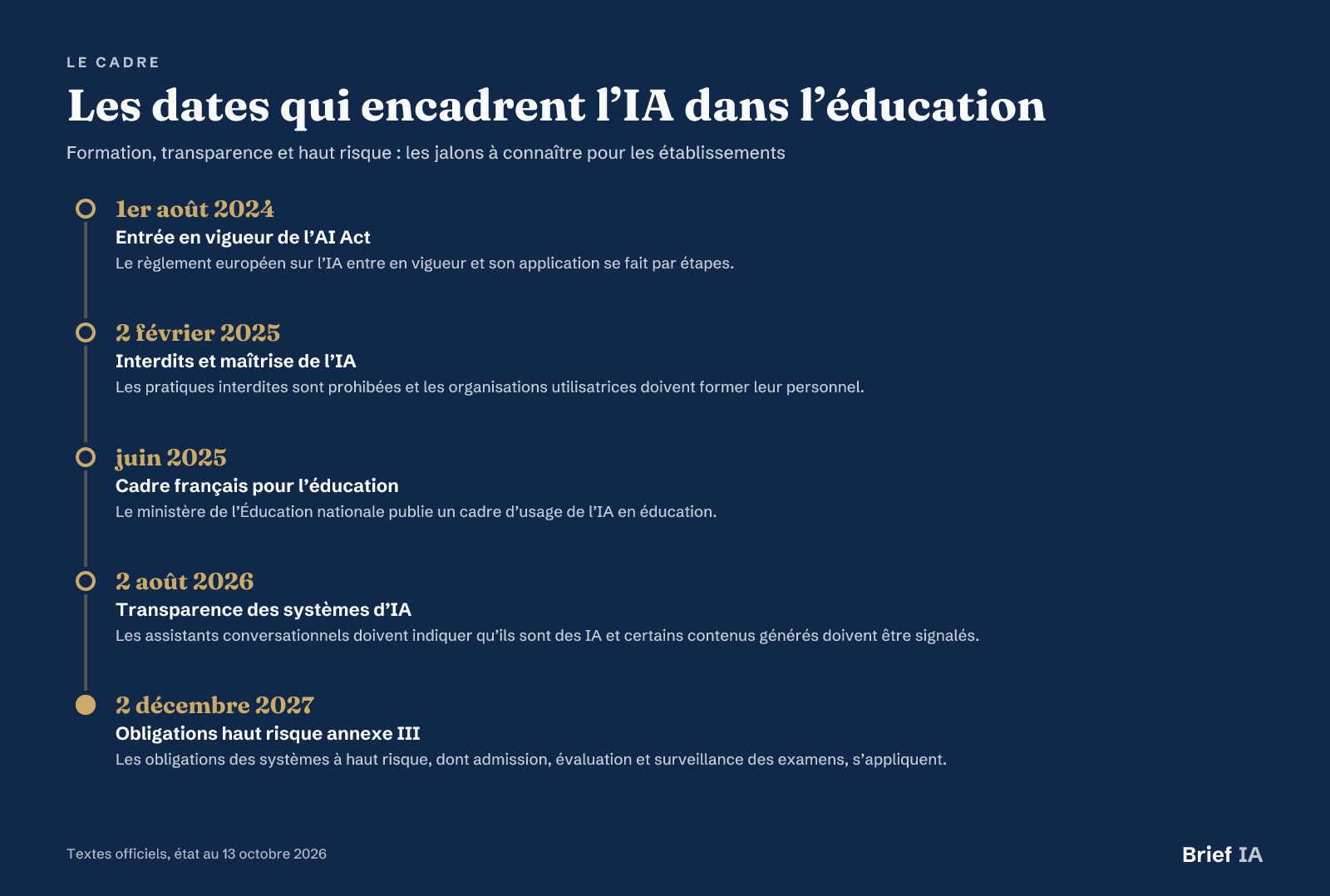 Key dates framing AI in education
Key dates, status as of October 13, 2026.
Mastery of AI and Prohibitions
The AI Act came into effect on August 1, 2024, and is being implemented in phases. Since February 2, 2025, any organization using AI systems must ensure a sufficient level of AI mastery among its staff. From the same date, prohibited practices are banned, including manipulation that exploits vulnerabilities and emotion recognition in educational institutions, except for medical or safety reasons.
Transparency Towards Learners
Since August 2, 2026, transparency obligations apply. A conversational assistant must indicate that it is AI, and certain generated content must be labeled as such. For an institution or training organization, this requires clarifying the tools used, the moments when the learner interacts with AI, and the generated outputs that must be indicated.
High Risk in Education
The AI Act classifies certain autonomous education and training uses as high-risk systems under Annex III: admission, assessment, and exam monitoring. Following the Digital Omnibus, obligations applicable to these high-risk systems will apply starting December 2, 2027. Before this deadline, general training and transparency obligations remain applicable.
Data and Automated Decisions
The GDPR has been in effect since May 25, 2018. Its Article 22 regulates decisions based solely on automated processing that produce legal or significant effects on a person. In an educational context, it is therefore necessary to avoid allowing a tool to independently decide on ranking, admission, punishment, or guidance. In companies, the CSE is informed and consulted when introducing new technologies.
Pitfalls to Avoid
Confusing Assistance and Substitution. A tool that explains a concept should not become one that learns, chooses, grades, or guides instead of the teacher. Sensitive uses require visible human validation and a written rule.
Banning Everything Without Alternatives. A blanket ban ignores the actual practices of learners. It often pushes uses outside the framework. It is better to distinguish between idea generation, reformulation, methodological assistance, and final production.
Sharing Too Much Data. Papers, student profiles, difficulties, absences, and individual comments may contain personal data. Teams must know what can be entered into a tool and what must remain off the platform.
Believing in Automatic Detection. Detecting generated text is not sufficient to build an evaluation policy. Work evidence, oral presentations, intermediate steps, and clear instructions provide a more solid framework.
Forgetting Parents and Learners. Concerns often arise from a lack of explanation. Presenting authorized uses, protections, limits, and learners' rights reduces distrust and facilitates gradual adoption.
Taking Action: The 90-Day Plan
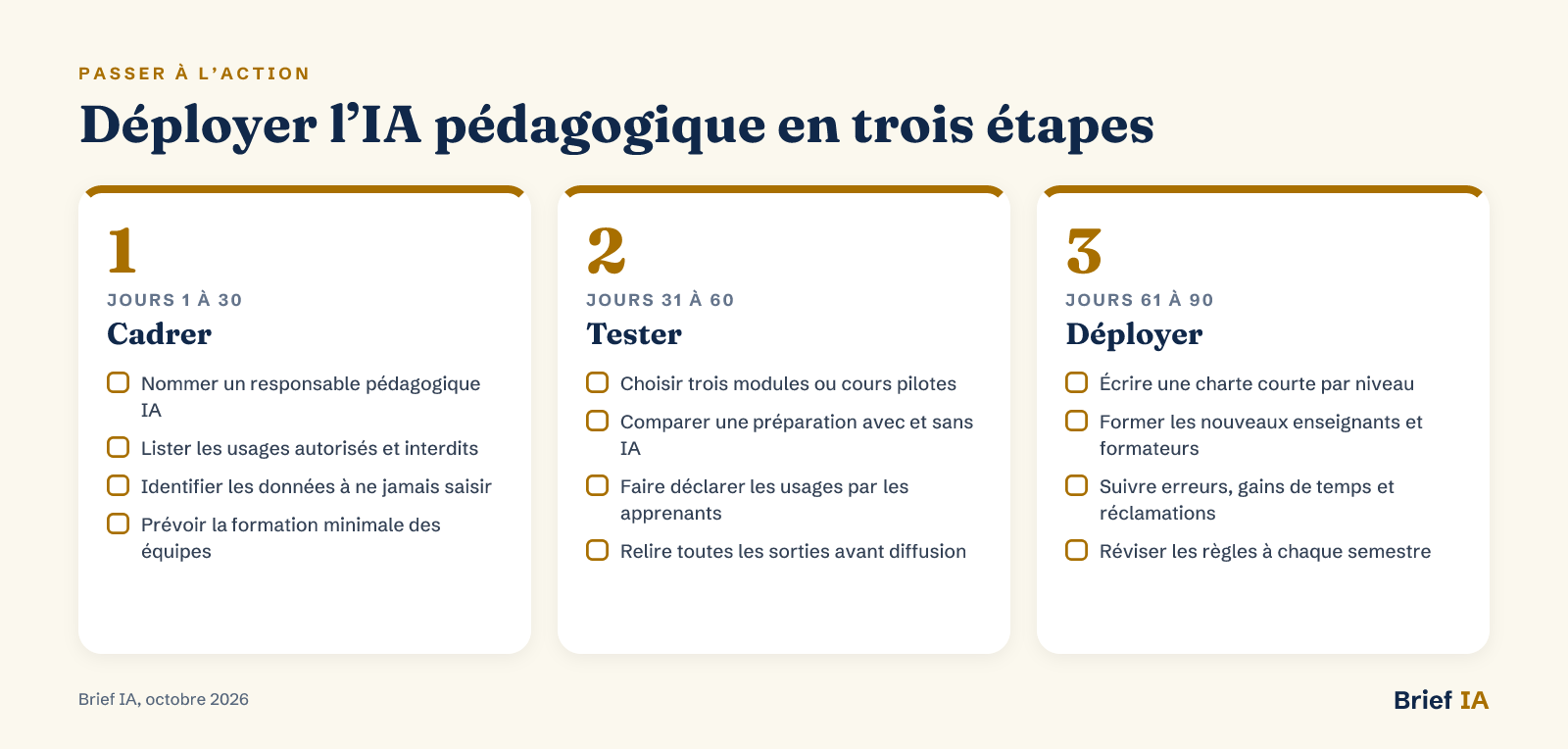 Deploying educational AI in three steps
Three steps: frame, test, deploy.
Start with three voluntary courses or modules, with specific objectives and non-sensitive data. During the following three months, train the team, test two tools, document usage rules, and measure time saved as well as observed errors. For professional training, the plan Impulsion IA 2027 reminds us that the stakes are as much about skills as about work organization.
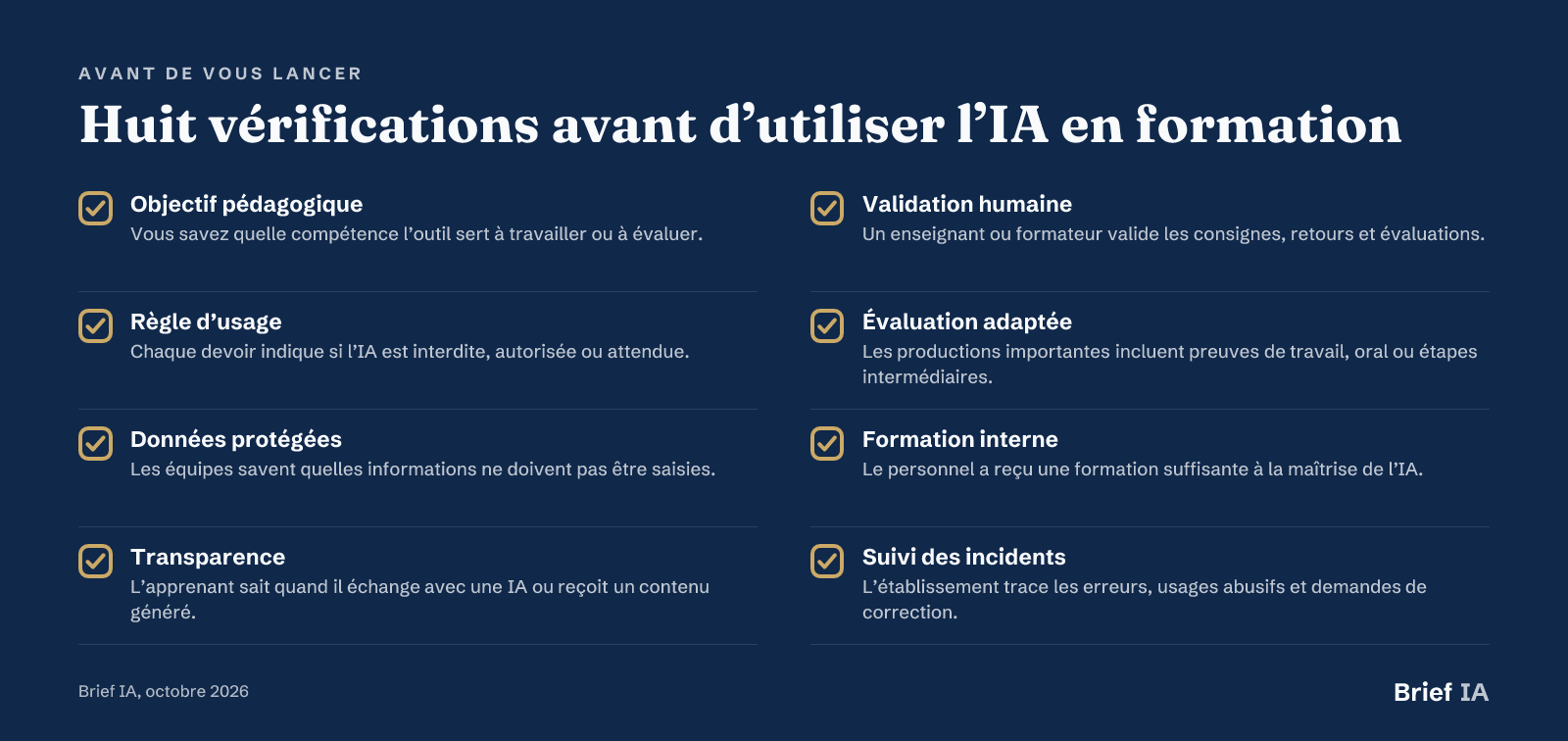 Eight checks before using AI in training
Eight checks to perform before each new use.
Further Reading
Our analyses for teachers and trainers
- Why MIT Wants AI Rules by Course. Here you will find a method to link AI use, educational objectives, and evaluation modes.
- Five Tools to Integrate AI Assistants in Class. The analysis compares lesson preparation, tutoring, avatars, and safeguards to consider before deployment.
- StudentSim and AI Tutor Training. You will understand how simulated students can help test a tutor before human trials.
- Learning a Language with AI Coaches. The guide presents Aimigo, Talkpal, EMMA, and useful practices for oral training.
- What On-Demand AI Changes for Trainers. The analysis shows how the value of trainers shifts towards adaptation, facilitation, and validation.
Key News to Remember
- OpenAI quantifies weekly educational use of ChatGPT
- Campuses Regulate AI Through Transparency and Human Decisions
- OpenAI and CodeAI Launch ChatGPT for Teens with Protections
- Google and UNICEF Launch AI Programs in Four Countries
- StudentSim Uses Simulated Students to Improve AI Tutors
Do you publish a solution for education and training?
This guide is read by teachers, trainers, educational leaders, and executives from training organizations. Brief IA offers publishers of educational AI solutions and training platforms dedicated articles, evening brief inserts, and promotion in the directory. Formats and rates at briefia.fr/partenaires.
The Essentials in Questions
How to Use AI in Class Without Encouraging Cheating?
The rule must be written for each assignment. Specify whether AI is prohibited, allowed for idea generation, permitted for reformulation, or expected as a working tool. Add process evidence: drafts, prompt journals, intermediate steps, oral presentations, or demonstrations. The goal is to assess reasoning, not just the final output.
Can a Teacher Grade Papers with AI?
AI can help prepare a rubric, identify weaknesses, or suggest formative feedback. It should not independently decide on a grade, punishment, or ranking. Papers may contain personal data: avoid submitting them into a tool without a validated framework, and maintain human validation on all feedback given to the learner.
What AI Act Obligations Already Concern Institutions?
Since February 2, 2025, prohibited practices are banned, and organizations using AI systems must ensure a sufficient level of AI mastery among their staff. Since August 2, 2026, transparency obligations apply: a conversational assistant must indicate that it is AI, and certain generated content must be labeled.
Are AI Tools for Assessment High Risk?
The AI Act classifies certain autonomous education and training systems as high risk, particularly for admission, assessment, and exam monitoring. Following the Digital Omnibus, obligations specific to high-risk systems in Annex III will apply starting December 2, 2027. General training and transparency obligations are already in effect.
Where to Start in a Training Organization?
Start with a pilot module without sensitive data: lesson preparation, practice quizzes, or reformulation of instructions. Measure time saved, errors produced, and trainer satisfaction. Only then should you expand to adaptive pathways or tutors. Document permitted uses, human validations, and prohibited data from the first test.
Brief IA — L'actualité IA en français
L'essentiel de l'actualité de l'intelligence artificielle, décrypté et expliqué chaque jour.