AI for Image and Video: The 2026 Reference Guide for Professionals
In China, the production of AI-generated short dramas reached an average of 470 short dramas per day in January, with timelines reduced from several months to just a few weeks and costs lowered by up to 90%. For studios, agencies, and video teams, the message is clear: AI is no longer just about producing spectacular images; it is reshaping preparation, testing, short formats, and certain effects. This guide details the effective uses, tools, rules, pitfalls, and a plan to get started.
What AI Really Changes for Image and Video
AI primarily shifts value upstream. In our analysis on Hollywood, the most robust uses involve idea generation, storyboards, previsualization, visual references, and certain post-production effects. The method remains simple: define what AI produces, what remains human, the individuals whose image or voice can be reproduced, and the validation steps. Without this production sheet, a visual test quickly becomes a poorly documented asset.
Video generators also change the iteration pace. Our comparison of Sora, Runway, and Pika shows different approaches: text-to-video, image-to-video, variable durations, credit-based models, and limited free offers. The right choice does not stem from the tool's name but from the plan to be created: testing a movement, stabilizing a composition, creating an insert, or preparing a vertical format.
The biggest change is not just aesthetic. The ease of creating credible images increases doubt about published content. Celebrity deepfake scams on TikTok reported by Copyleaks, debates over children's faces, and disputes over model training remind us that a studio must treat AI as a complete production chain: briefing, permissions, generation, validation, tagging, and archiving.
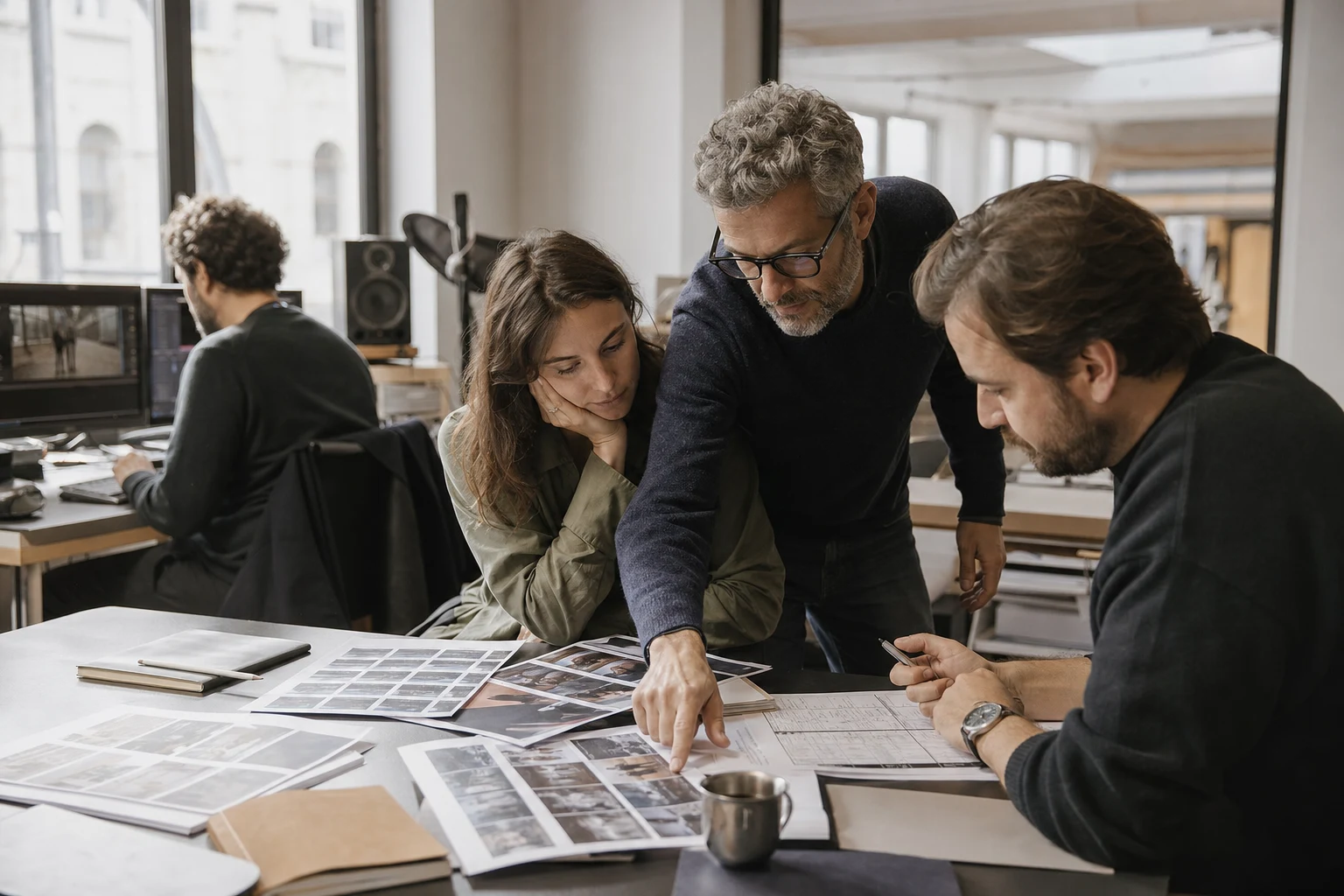 Video team in studio reviewing a printed shot list.
AI accelerates testing, but validation remains human.
Effective Uses Today
The most reliable uses do not replace a shoot or artistic direction. They primarily reduce the cost of tests, better prepare decisions, and accelerate variations.
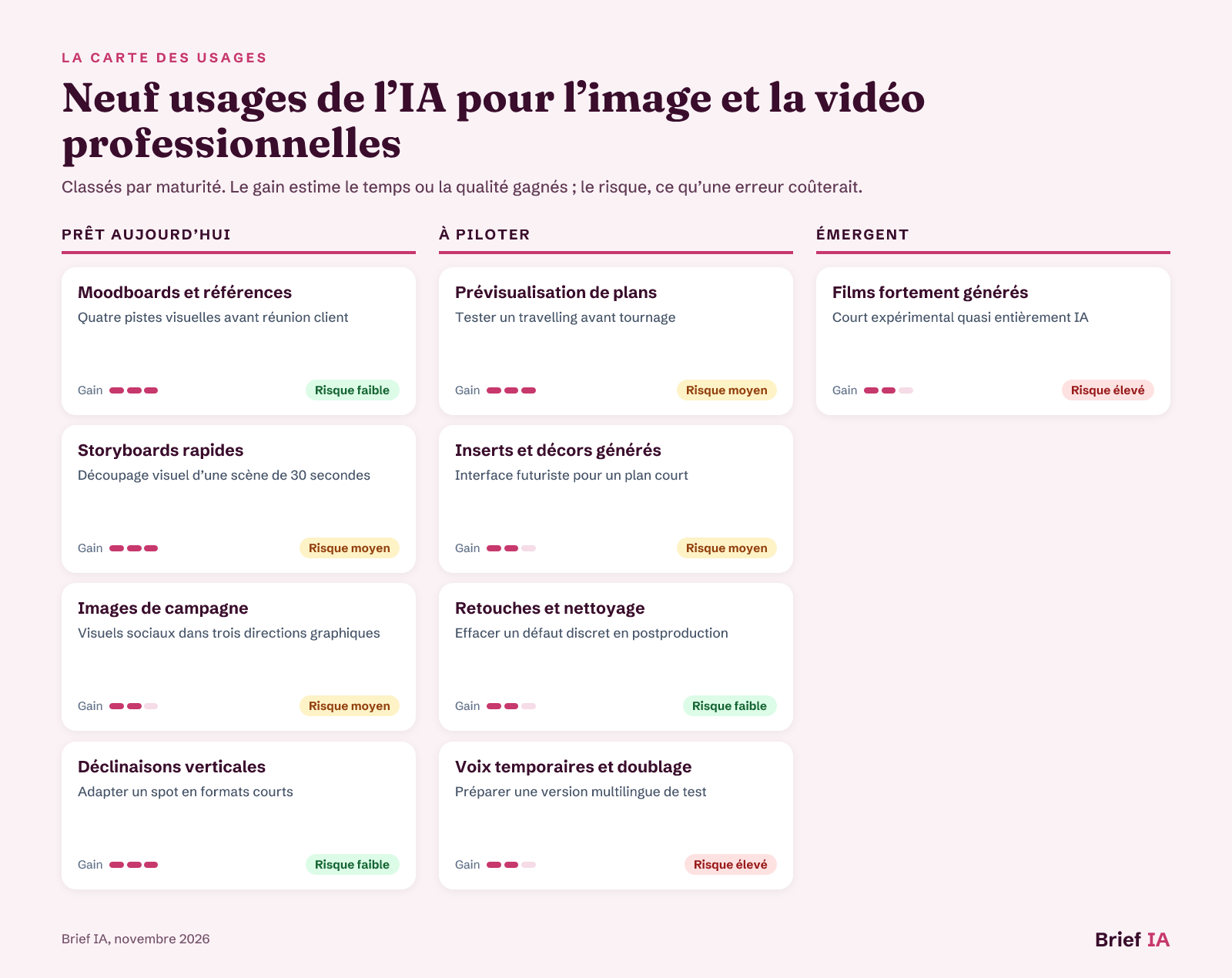 Map of AI uses for creatives and video teams
Uses classified by maturity, with expected gains and risks in case of error.
Ready-to-Use Applications
Moodboards and References. Creating visual references from a brief helps align the director, art director, client, and production team before committing resources. The use is solid when it remains exploratory: the images serve to discuss lighting, composition, atmosphere, and props, then are replaced or validated by mastered elements. Documenting prompts and versions prevents losing the origin of a creative lead.
Quick Storyboards. Transforming a script into thumbnails accelerates discussions on framing, camera angles, and pacing. Our analysis of cinema tools describes Runway Gen-3 as a tool used in storyboarding, previsualization, and style experimentation. The result should remain a decision support: it does not replace the director's breakdown or the cinematographer's work.
Campaign Images. Image generators quickly produce leads for posters, thumbnails, banners, or marketing illustrations. Layout-oriented models become interesting when the composition needs to remain stable. Our analysis on REVE 2.0 describes an approach where the image is planned before rendering, with a modifiable layout structure. For professional use, require validation of texts, absent logos, and exploitation rights.
Vertical Variations. Adapting a video into vertical, square, or short versions is an effective use if the team retains the master edit. Tools can offer cropping, styling, rhythm variations, and visual hooks. Our analysis of Higgsfield describes a multi-model hub logic for producing marketing video content, avatars, and advertisements. Maintain editorial control over the message and mandatory mentions.
Uses to Manage
Previsualization of Shots. Video generation allows exploring camera movement, lighting ambiance, or a complex scene before locking a budget. This is useful for science fiction scenes, crowds, or difficult sets. The risk comes from overpromising: a plausible shot in previsualization may remain unusable in the final render if hands, faces, or objects drift.
Generated Inserts and Backgrounds. Inserts, fictional screens, stylized backgrounds, and set extensions are good candidates when their duration is short and their narrative function limited. They reduce certain needs for simple graphics or VFX. Management focuses on visual consistency, absence of recognizable brands, stability between shots, and integration into the existing compositing chain.
Retouching and Cleanup. Image cleaning, retouching, background replacement, and local corrections can accelerate post-production. The use remains robust when it targets specific and verifiable defects, rather than a complete transformation of the shot. Before release, always compare the modified version to the original rush, especially on faces, hands, technical objects, and lighting continuity.
Temporary Voices and Dubbing. Synthetic voice helps test a rhythm, intention, or foreign version before final recording. It becomes sensitive as soon as it mimics an identifiable person or replaces a performance. The production sheet must specify authorized voices, temporary uses, and retained files. Without clear agreement, a credible voice can create a risk of rights and trust.
Emerging Uses
Heavily Generated Films. Films that are almost entirely generated remain exploratory projects. A public competition for short films made with AI tools was organized in 2026 by Bitcoin FilmFest and MoneroKon, with films screened at the festival. This type of production is suitable for experimentation, pitching, or highly stylized formats, but narrative continuity, rights, and public perception must be anticipated.
Tools to Know
There is no universal ranking: one must think in terms of families of tools, deliverables, rights, and integration into the production chain.
- Image and Layout Generators. They produce concepts, posters, thumbnails, sets, and graphic directions from prompts or more controlled structures. REVE 2.0 illustrates the interest of planned layout before rendering. Requirements: usage rights, prompt history, format control, absence of watermark, high-definition export.
- Text or Image-to-Video Generators. They are used to test a shot, animate a reference image, create inserts, or explore a short scene. Differences lie in duration, resolution, credits, APIs, and presence of editing tools. Requirements: cost per second, maximum duration, resolution, temporal stability, AI reporting.
- Multi-Model Hubs for Campaigns. They bring together several models in one interface to produce social variants, UGC videos, avatars, and marketing formats. Higgsfield is described as a multi-AI generator providing access to various video and visual models. Requirements: model selection, generation log, readable quotas, API, watermark removal.
- Design and Visual Prototyping Tools. They transform prompts, files, or product photos into prototypes, stylized objects, or mockups. Claude Design is described as capable of generating non-photorealistic stylized 3D objects for pages, thumbnails, and presentations. Requirements: modifiable exports, brand fidelity, comparable versions, separation of mockup and code.
- Voice, Music, and Dubbing Tools. They generate voices, songs, or temporary tracks from prompts, with adjustments depending on the services. For video, their value lies mainly in prototyping, rhythm, and version testing. Requirements: voice authorization, broadcasting rights, export quality, traceability, human control.
Le brief IA que les pros lisent chaque soir
Les 7 actus IA du jour, décryptées en 5 min. Gratuit.
Inclus dès l'inscription : notre sélection des meilleurs guides & comparatifs IA.
Choisissez votre rythme
Gratuit · Pas de spam · Désabonnement en 1 clic
The Framework: Transparency, Training, and Rights of Individuals
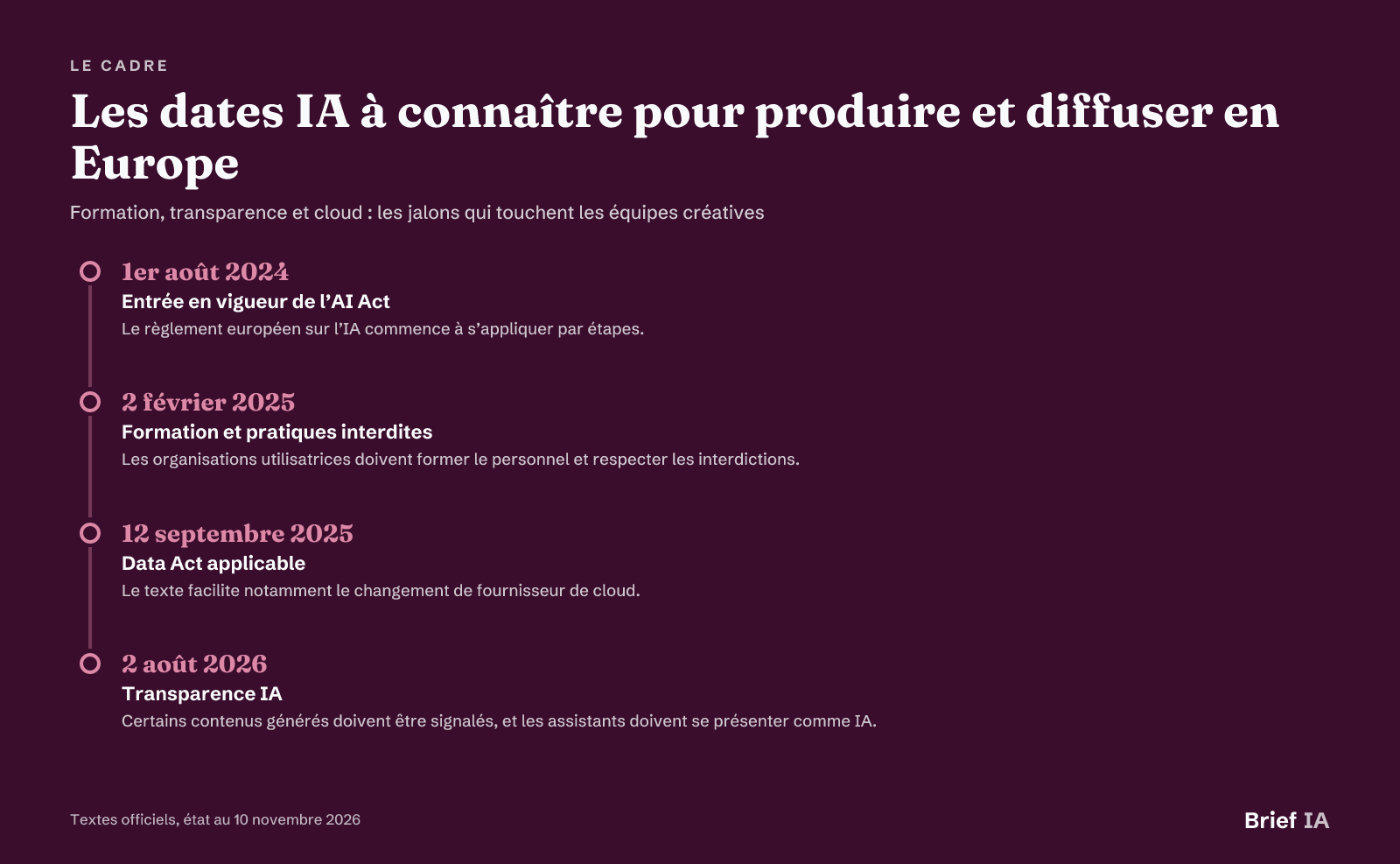 Key AI dates to know for production and broadcasting in Europe
Key dates, status as of November 10, 2026.
AI Act in Daily Life
The European AI regulation came into effect on August 1, 2024, and applies in phases. Since February 2, 2025, any organization using AI systems must ensure a sufficient level of AI mastery among its staff. For an image or video team, this means training creatives, editors, producers, and validators on the limitations of tools, rights, and internal reporting procedures.
Content Transparency
Since August 2, 2026, transparency obligations apply. A conversational assistant must indicate that it is an AI, and certain generated content must be marked as such. Sanctions under the AI Act can reach 15 million euros or 3% of global annual revenue for relevant obligations, and up to 35 million euros or 7% for prohibited practices.
People and Workplace
Prohibited practices include manipulation that exploits vulnerabilities and emotion recognition in the workplace, except for medical or security reasons. The Labor Code also stipulates that the CSE must be informed and consulted when introducing new technologies into the company. A team deploying AI tools in production must therefore treat the impact on employees as an organizational issue, not just a software purchase.
Cloud and Vendor Lock-In
The Data Act has been applicable since September 12, 2025. It organizes access to data produced by connected objects and facilitates changing cloud providers. For video teams, the practical issue is to avoid locking rushes, prompts, renders, brand models, and version histories into a service that is difficult to leave. Contracts must provide for export, reversibility, and controlled retention.
Pitfalls to Avoid
Confusing Test and Deliverable. A reference image may be appealing in a meeting but remain unusable in release. Classify each AI output as soon as it is created: inspiration, mockup, temporary element, or publishable asset. This qualification determines rights, quality, and transparency controls.
Underestimating Deepfakes. The ease of modifying a face or voice imposes a strict rule: no reproduction of an identifiable person without clear authorization and documented use. Our analysis on deepfakes shows that the issue also affects trust in authentic images.
Ignoring Provenance. Disputes between publishers, OpenAI, and Microsoft show that the origin of training data remains contested. The press and AI case reminds us of the importance of questioning suppliers about licenses, blocks, documentation, and contractual guarantees.
Forgetting the Real Cost. The displayed price is not enough. Check monthly credits, cost per second, resolution, watermark, queues, commercial rights, and API fees. A cheap tool for ten tests can become expensive if each shot needs to be regenerated several dozen times.
Automating Direction. A model may propose a convincing image, but it does not alone carry the perspective of a scene, the continuity of a character, or the rhythm of editing. Designate an artistic director who decides, validates, and archives the decisions.
Taking Action: The 90-Day Plan
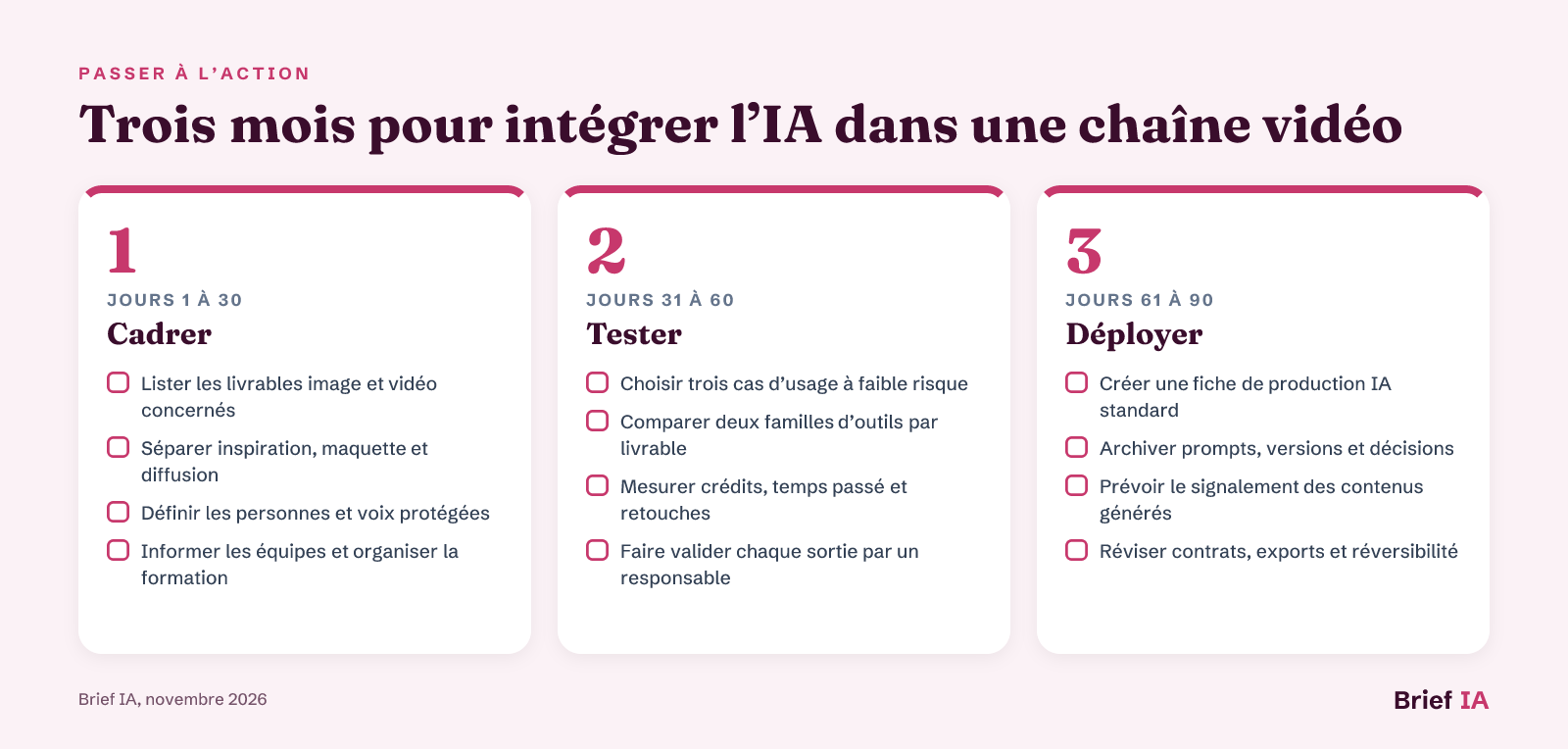 Three months to integrate AI into a video chain
Three steps: frame, test, deploy.
Start with a short, visible, and low-risk project: internal trailer, campaign moodboard, or previsualization of a scene. The first month is for framing rights, roles, and tools. The second month tests three uses with measures of time, cost, and quality. The third month deploys only validated uses, with training, template sheets, and transparency procedures.
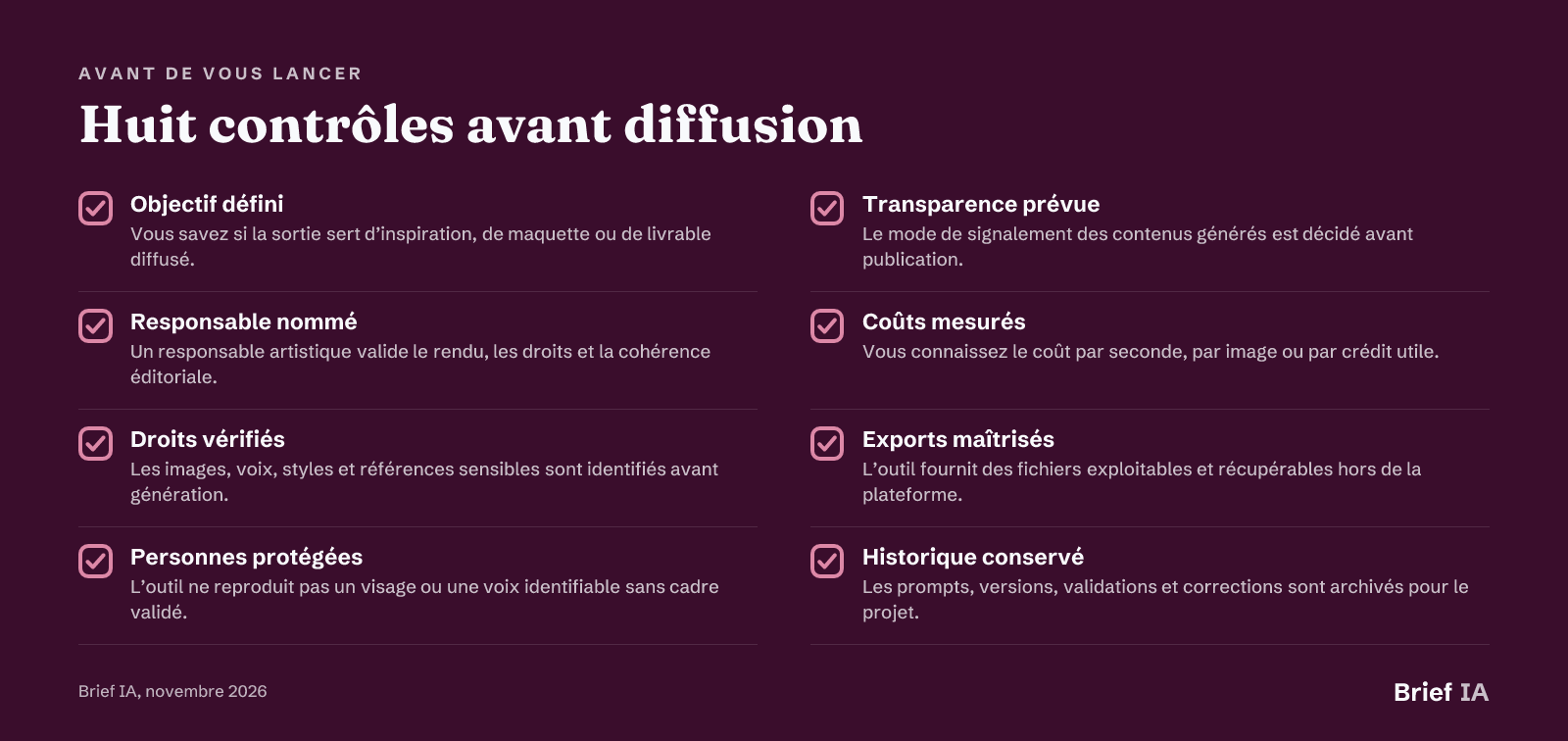 Eight checks before release
Eight verifications to perform before each new use.
Further Reading
Our analyses for creatives and video teams
- Method for integrating AI into audiovisual production. Here you will find a production method, from the role of AI to human validations.
- Comparing Sora, Runway, and Pika for AI video. The article helps choose based on duration, quality, price, API, and production uses.
- Five AI tools used in cinema and audiovisual. Here you see where AI is already serving in storyboarding, previsualization, VFX, and dubbing.
- REVE 2.0 and image creation through layout. The analysis explains the interest of a model that plans composition before 4K rendering.
- Deepfakes: why video is no longer enough as proof. Here you measure the risks of trust, impersonation, and image verification.
- Higgsfield to industrialize AI marketing videos. The guide details the use of a multi-model hub for avatars, social formats, and campaigns.
Key News to Note
- Runway raises nearly $860 million and aims for global models
- Hollywood adopts AI as tensions over rights accumulate
- In China, AI produces an average of 470 short dramas per day
- Photographers stop posting children's faces on Instagram
- Press and AI: licenses and fair use are debated in court
- Two methods for obtaining less predictable AI designs
Are you publishing a solution for professional image and video creation?
This guide is read by creative directors, producers, directors, editors, designers, marketing managers, and video teams. Brief IA offers publishers of visual, video, design, post-production, and rights management solutions dedicated articles, evening brief inserts, and promotion in the directory. Formats and rates at briefia.fr/partenaires.
The Essentials in Questions
Which AI to use for creating professional images in 2026?
The choice depends on the deliverable. For artistic concepts, an image generator suffices. For stable composition, prioritize a tool that controls layout. For a campaign, especially check commercial rights, exports, watermark, prompt traceability, and the ability to create multiple formats.
Can an AI-generated video be used in a client campaign?
Yes, if the tool's contract allows the intended use, if sensitive people, brands, and references are managed, and if the required reporting is planned. Validation must include visual quality, editing consistency, rights, and transparency. A generated output should not go directly from prompt to release.
Should it be indicated that an image or video was generated by AI?
Since August 2, 2026, the transparency obligations of the AI Act apply. A conversational assistant must indicate that it is an AI, and certain generated content must be marked as such. Teams must therefore decide, before publication, which content falls under reporting and how that appears.
How to avoid deepfake issues with AI video?
Prohibit the reproduction of an identifiable face or voice without a validated framework. Retain permissions, limit temporary uses, archive prompts, and have renders validated by a responsible person. As fake videos have become accessible, the procedure must be written and known to the team.
Can AI replace a video team?
The elements of the guide rather show a shift in work. AI accelerates testing, storyboarding, certain inserts, variations, and post-production preparation. It does not replace artistic direction, editorial responsibility, rights management, actor performances, or the overall coherence of an edit.
Brief IA — L'actualité IA en français
L'essentiel de l'actualité de l'intelligence artificielle, décrypté et expliqué chaque jour.