Lovable review: our verdict after building a real app in 20 minutes
Le brief IA que les pros lisent chaque soir
Les 7 actus IA du jour, décryptées en 5 min. Gratuit.
Inclus dès l'inscription : notre sélection des meilleurs guides & comparatifs IA.
Choisis ton rythme
Gratuit · Pas de spam · Désabonnement en 1 clic
Lovable, the platform valued at $13.3 billion in August, promises to turn a plain description into a complete web app, with no coding. To check, we gave it an ordinary small-business need: a prospect tracker for a freelance consultant. In four requests, 12.4 credits and about twenty minutes, checks included, we ended up with an app in French featuring a dashboard, a column view, an Excel export and user accounts. The result is convincing. It was not perfect on the first try, though, and a few points are worth checking yourself before trusting it with real clients.
Try Lovable for freeThe free plan gives you 5 credits a day, enough to start a first app. Partner link: Brief IA may earn a commission, at no extra cost to you.
The test scenario
A freelance consultant wants to keep track of her prospects: who to contact, where each quote stands, who to follow up with today. She does not code. Every request, or prompt, is therefore written the way she would write it: you describe what you want to see on screen, never how to build it.
After each version, we went over everything by hand: calculations redone, a fictitious prospect added, sorting and filters, page reload, phone display, exported file inspected.
First request: the basic app
The starting request fits in one paragraph (we wrote it in French, since the app is for a French user):
Create a prospect tracking web app for a freelance consultant. She must be able to: add a prospect (name, company, email, phone, stage, estimated amount in euros, next follow-up date, notes); see all her prospects in a table she can sort and filter by stage; see a dashboard with the total amount in progress, the number of prospects per stage and today’s follow-ups. The stages are: To contact, In discussion, Quote sent, Signed, Lost. Interface entirely in French, sober and professional design, usable on a phone.
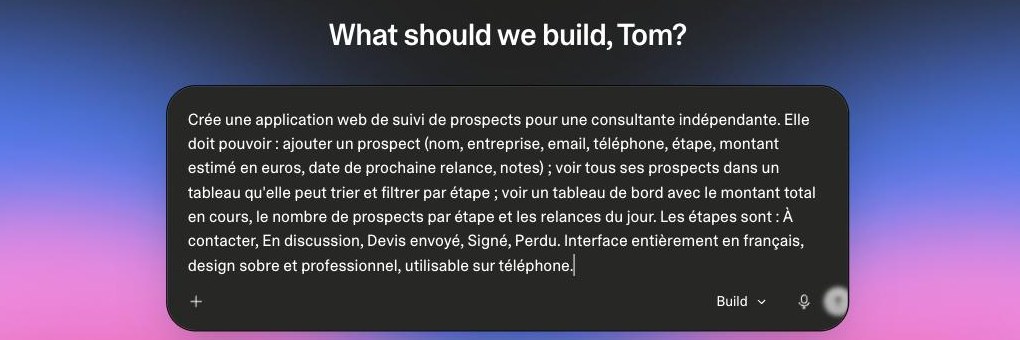 The starting request, typed on Lovable’s home page.
First surprise: Lovable does not jump straight into code. It offers three design directions, each with a full mock-up of the home screen: "Sillage", dark with rounded corners; "Pivot", dark with terminal-style type; "Relais", light, in a paper-and-ink style. You pick one with a click, or describe something else. We went with Relais.
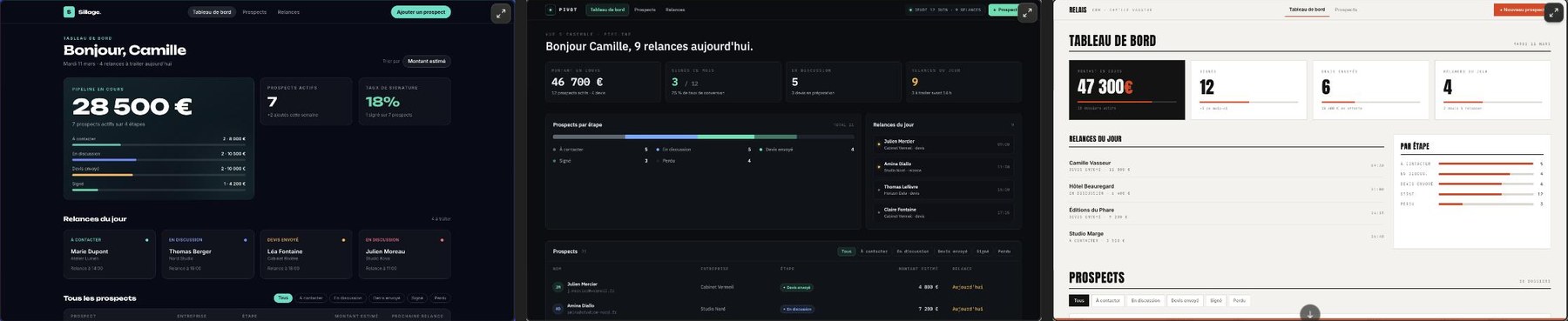 Before writing a single line of code, Lovable offers three design directions: Sillage, Pivot and Relais.
The app arrives after 3 minutes 25 seconds of work, for 3 credits. Everything we asked for is there: a dashboard (amount in progress, signed prospects, pending quotes, today’s follow-ups, breakdown by stage), a list you can filter by stage and sort by clicking the columns, and a form to add, edit or delete a prospect. Lovable added six sample prospects, which you can edit or delete, and points out on its own that the data stays in the browser for now.
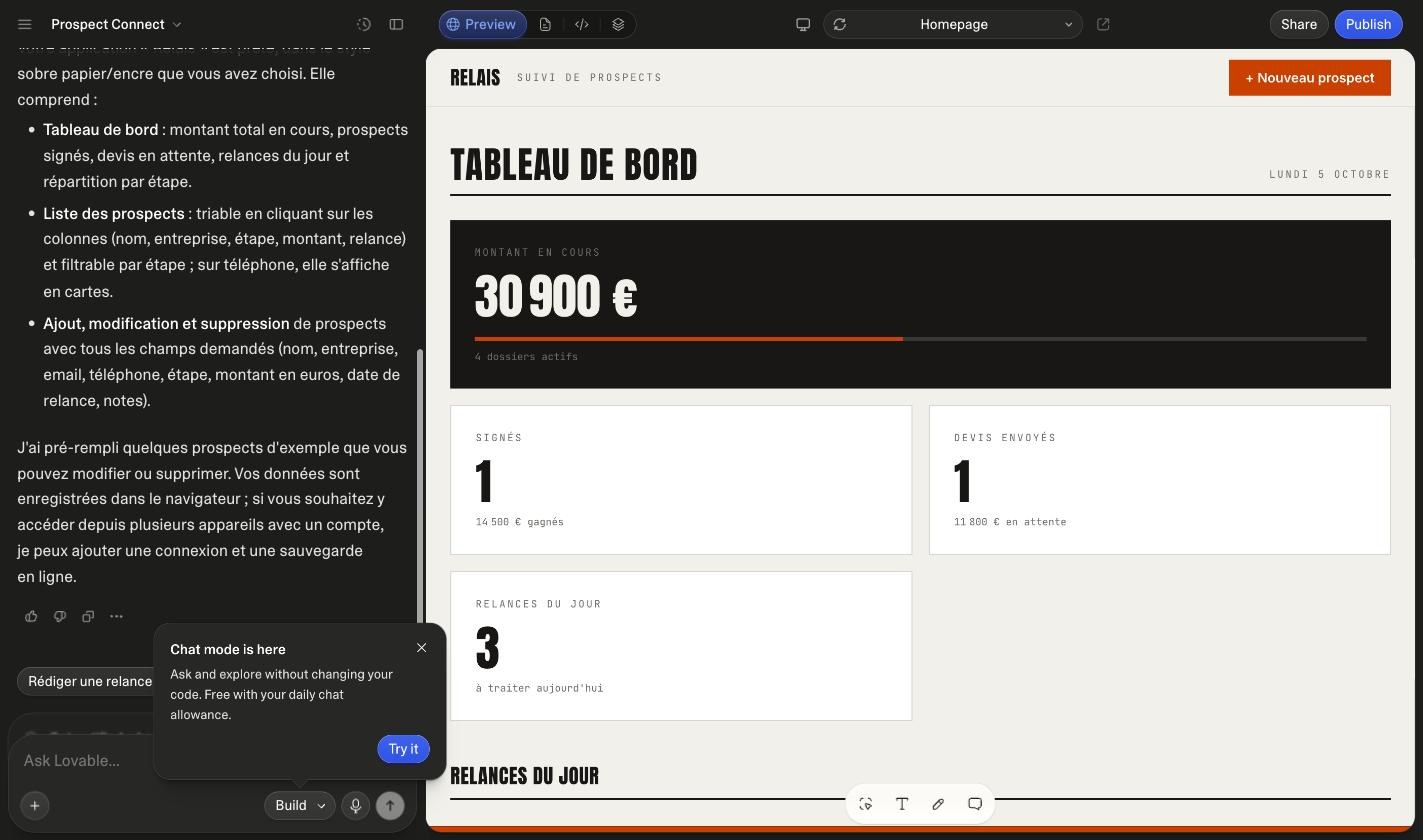 The Lovable editor after the first request: the conversation on the left, the app on the right.
The numbers add up. The €30,900 in progress matches the four open deals (3,500 + 9,200 + 6,400 + 11,800 euros), signed and lost ones excluded. We added a fictitious prospect, Inès Martin from Studio Ardoise, at €8,500 in the "Quote sent" stage with a follow-up due the same day: the amount in progress rose to €39,400, pending quotes to €20,300 and today’s follow-ups from 3 to 4. Sorting by amount works both ways, the stage filter keeps only the right deals, and everything is still there after a page reload.
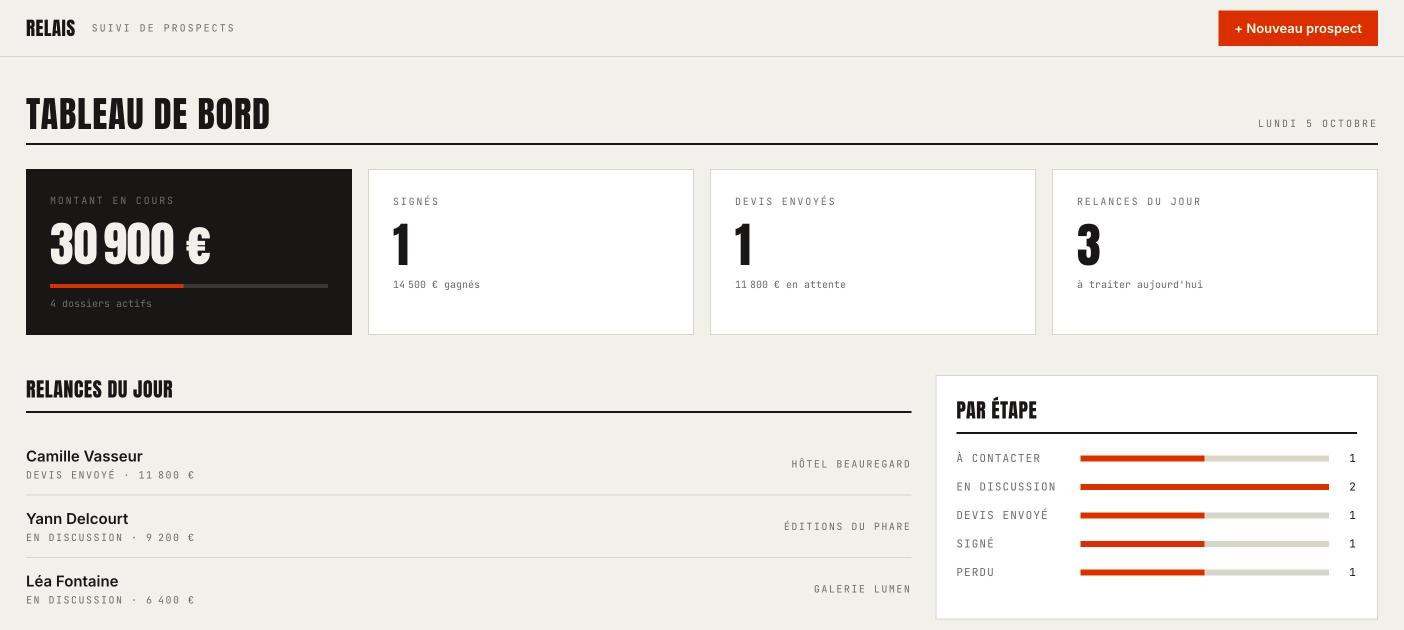 The dashboard: amount in progress, signed deals, pending quotes, today’s follow-ups and breakdown by stage.
On a phone, the dashboard switches to a single column and the list becomes a stack of readable cards.
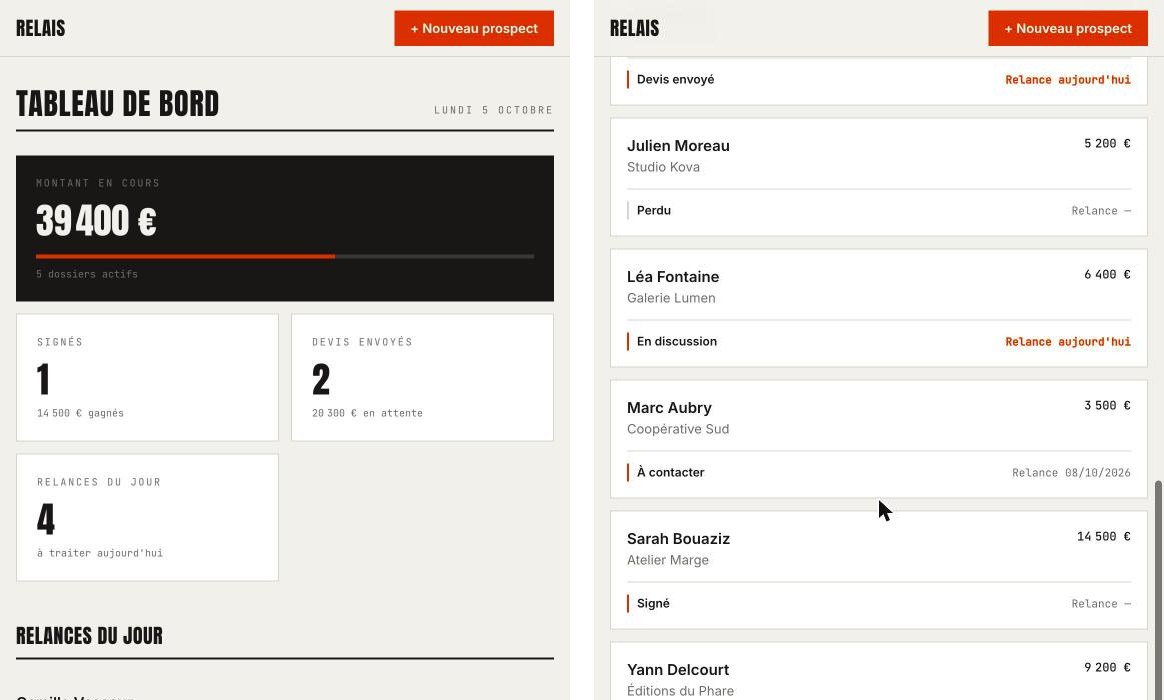 On a phone: the dashboard on the left, the list as cards on the right.
Run this test in LovableCopy our starting request and paste it as is: the first version cost us 3 credits. Partner link.
Second request: the flaw Lovable missed
A problem shows up on the very first click. On a computer, the "New prospect" button opens the form at the very bottom of the page, off screen: you click and nothing seems to happen. Lovable had not caught it.
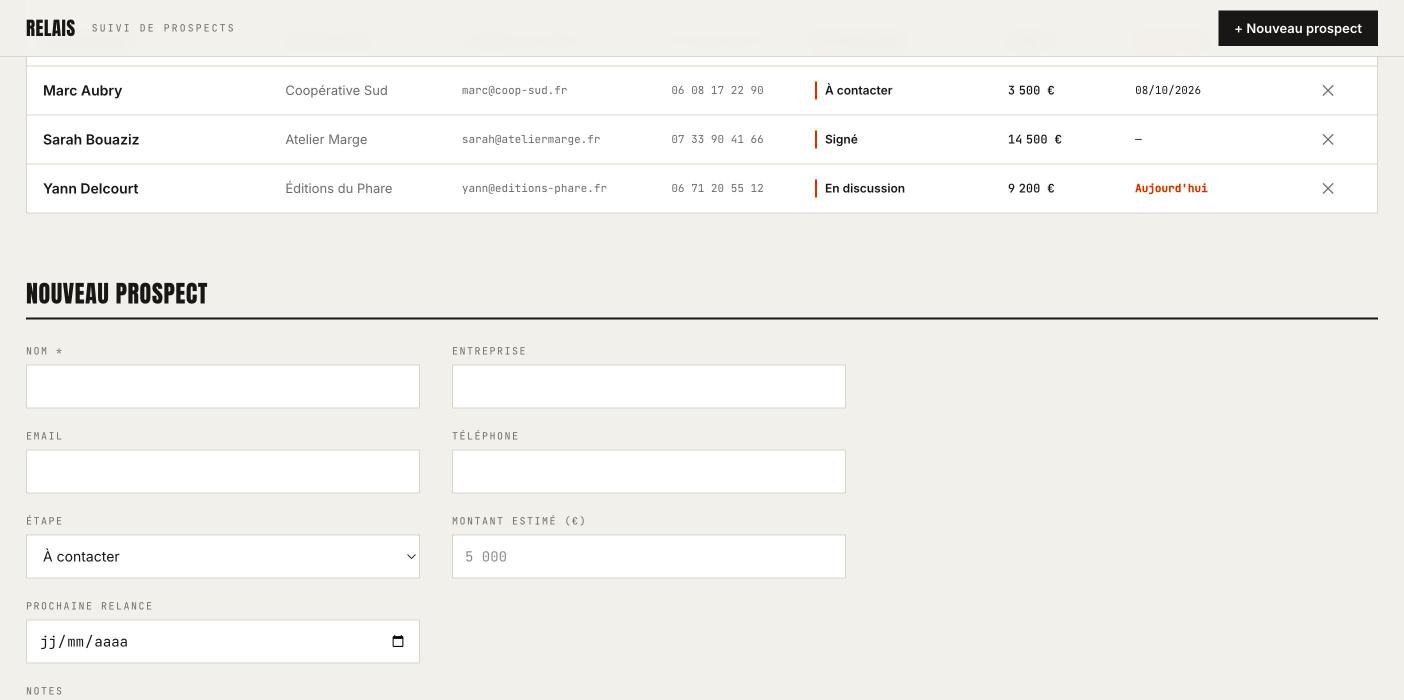 In the first version, the form opened below the list, invisible unless you scrolled down.
Two sentences are enough to fix it, without any technical vocabulary:
When I click "New prospect" or on a prospect in the list, the form opens at the very bottom of the page and I can’t see it. Open it in a window in the center of the screen instead, with a button to close it.
In 1 minute 57 seconds and for 2.2 credits, the form now opens in a centered window, which closes with the cross, the "Close" button, the Escape key or a click outside. We tried all four.
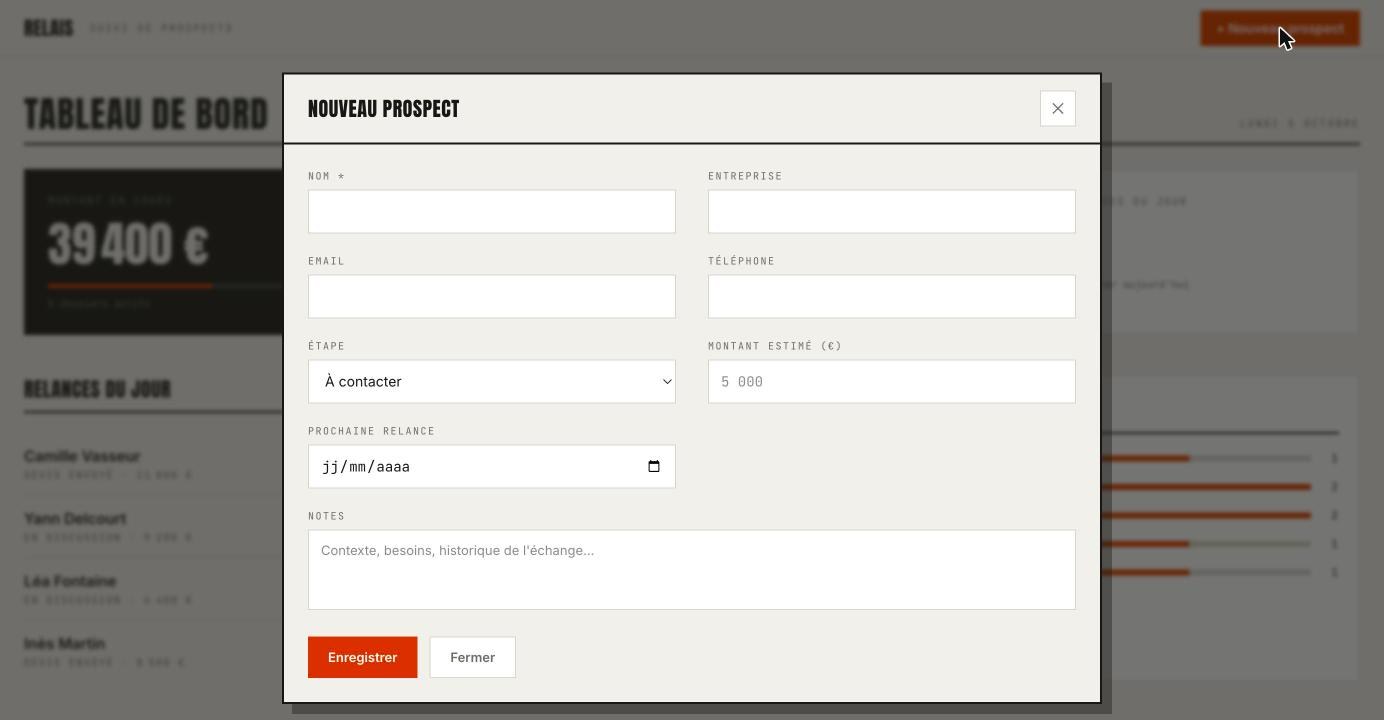 The fixed version: the form opens in a window in the center of the screen.
That is the main lesson of this test: Lovable builds fast and well, but it does not replace someone who clicks everywhere. Each version deserves five minutes of testing before the next request.
Third request: column view and Excel export
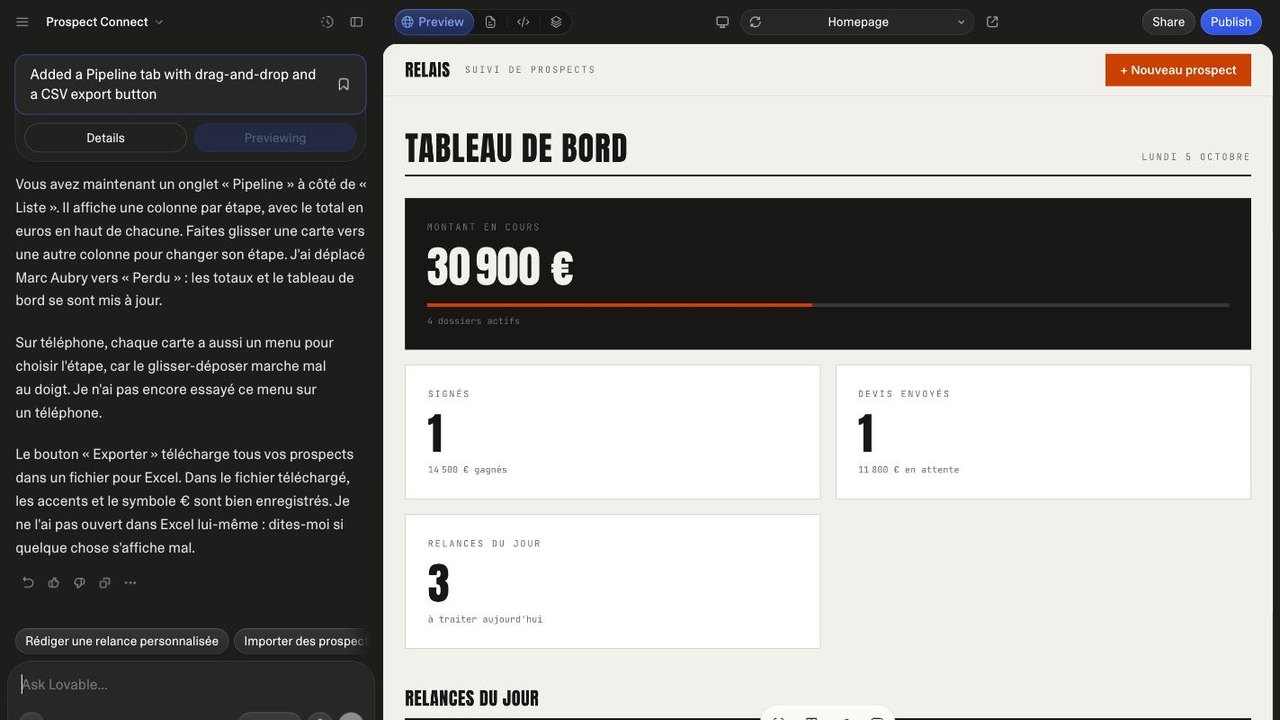
We then asked for two more ambitious features: a "Pipeline" tab with one column per stage, the total in euros at the top of each, and cards you can drag from one stage to another; then a button that exports every prospect to a file Excel can read, accents and euro sign included. Cost: 2 minutes 29 seconds and 3.1 credits.
Drag and drop works. Moving Marc Aubry from "To contact" to "In discussion" drops the first column to €0, which then shows "Drop here", lifts the second from €15,600 to €19,100, and the dashboard follows instantly.
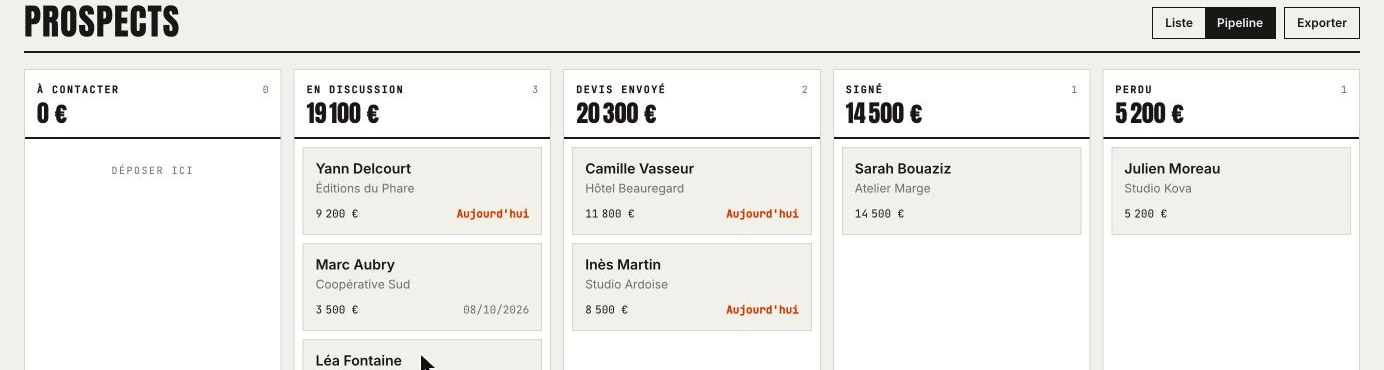 The Pipeline view after moving a card: each column recalculates its total on the spot.
The export downloads a file dated with the day. We inspected it: semicolon-separated columns and an encoding marker at the start of the file, which is what Excel needs on a French-language computer to recognize the columns and keep the accents. Amounts are written as plain numbers (11800 rather than "€11,800"), so Excel can add them up.
Lovable also qualified its own report: it says it did not open the file in Excel, nor try on a phone the menu it added to change stages with a finger, since drag and drop works poorly on touch screens. That candor helps you know what to check yourself.
Fourth request: accounts and online saving
The last step is the one that turns a mock-up into a working tool: finding your prospects on both computer and phone through an email login, with each user seeing only her own data. It is the most expensive request: 3 minutes 17 seconds and 4.1 credits.
Lovable turns on its own database service, Lovable Cloud, creates a table for the prospects and a "Connexion" (sign-in) page with a "Créer un compte" (create an account) link. It also plans to copy into the account, at first sign-in, the prospects already entered in the browser.
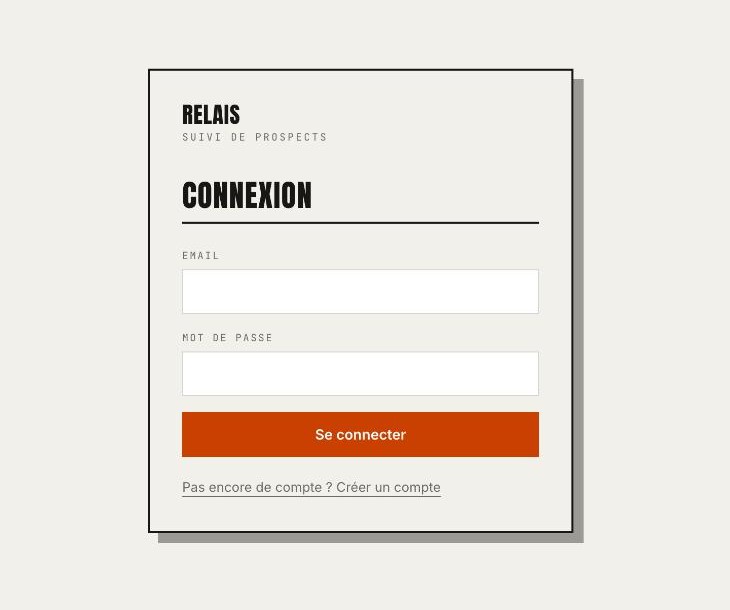 The sign-in page added by the fourth request, in the same style as the rest of the app.
For client data, the deciding factor is the database access rule. We read it in the Cloud tab: the table is protected and a single rule applies, which only lets the account that created a row read or change it. That is exactly what you want.
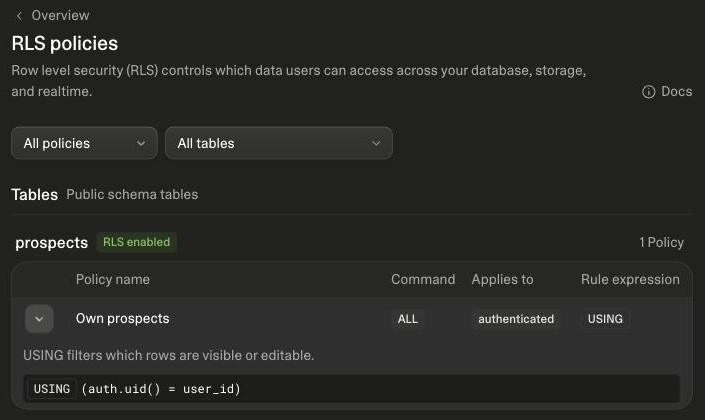 In Lovable Cloud, the access rule on the prospects table: each account only sees its own rows.
Security: one good point, one warning
Lovable offers two free checks. The quick scan runs on every publish. The deep scan, on demand, has AI agents review all the code for flaws specific to the app: access rights, data, logic. It found nothing, while reminding you that no scanner catches every risk.
The warning comes from the components. The app relies on 53 of them, chosen by Lovable, and one, @tanstack/react-start, carries two known vulnerabilities rated "high". Lovable flags this itself and offers to fix them without using credits. Do it before going live with real data: security is a sensitive topic at Lovable, whose CEO apologized in April after an alert about user data being accessible.
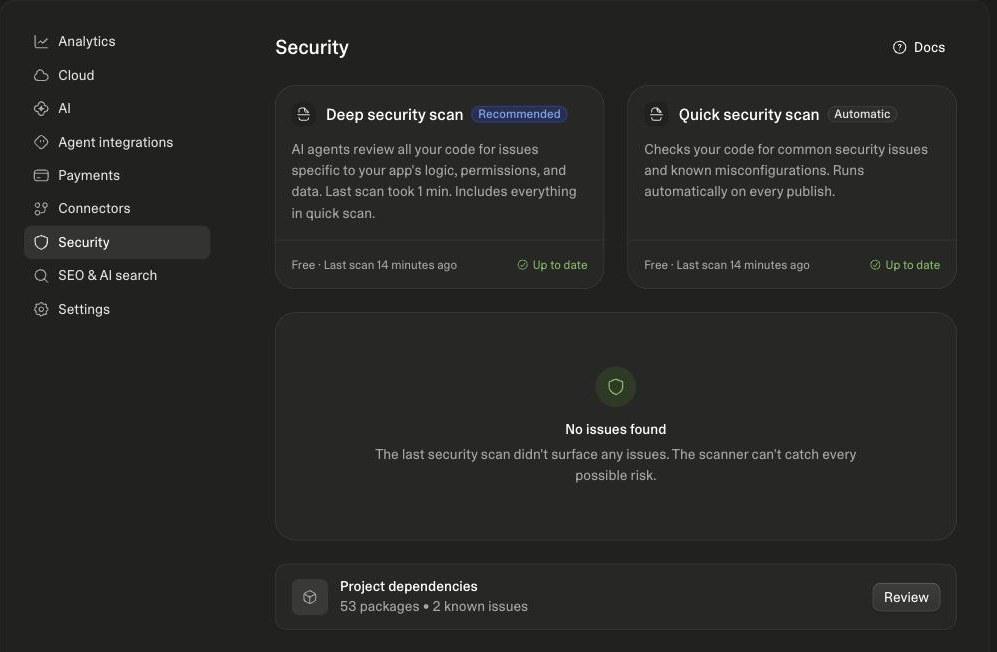 The Security panel: nothing to report in the app’s code, two known vulnerabilities in its components.
How many credits this app took
- Basic app: 3 min 25 s of work, 3 credits.
- Form fix: 1 min 57 s, 2.2 credits.
- Pipeline and Excel export: 2 min 29 s, 3.1 credits.
- Accounts and online saving: 3 min 17 s, 4.1 credits.
- Total: 11 min 8 s of work, 12.4 credits.
These figures are shown in Lovable, in the three-dot menu under each reply: handy for tracking your usage. As a reference point, Lovable quotes 1.2 credits to "add authentication with sign up and login": our fourth request cost more than three times that, because it also added the database and carried over the existing prospects. The cost of a request depends on its complexity and is only known once the work is done.
Lovable pricing: the four plans
Taken from Lovable’s website on October 5, 2026, VAT included, in dollars:
- Free: 5 build credits a day, up to 30 a month, plus 20 credits a month for hosting and the database. Our app would have taken three days of credits.
- Lite, $5 a month: 5 credits a day, a custom domain and removal of the Lovable badge.
- Pro, $25 a month: 100 credits a month on top of the daily credits, carried over for one month, plus on-demand top-ups. Our app represents about an eighth of this plan.
- Business, $50 a month: 100 credits, single sign-on (SSO), private projects and publishing restricted to team members.
Paying yearly gives you two months free, and students can get up to 50% off the Pro plan. According to Lovable’s terms, the code and the data belong to the user, who can download the full code from the editor.
Get started with LovableThe free plan is enough to try it; Pro becomes useful when 5 credits a day are no longer enough. Partner link.
What about the alternatives?
Lovable’s closest competitors are Bolt, Replit and v0, which we covered in Lovable, v0, Replit: AI simplifies development, and our AI tools directory covers the whole market. Cursor meets a different need: it helps a developer write their own code, rather than producing the app for them.
Our verdict
Lovable delivers on its main promise: without writing a line of code, you get a working tool in French in about twenty minutes, accurate in its calculations, usable on a phone and with account sign-in. Two things pleasantly surprised us: being asked to choose a design direction before any code, and the honesty of reports that separate what was checked from what was not.
Pros
- A complete and accurate app from the very first request.
- Three design directions to choose from before any code.
- Quick fixes, requested in plain language.
- A correct access rule: each account only sees its own data.
- A free security scan and fixes that cost no credits.
Cons
- A display flaw that went unnoticed in the first version.
- A credit cost you cannot know before sending a request.
- Two known vulnerabilities in a component added by Lovable, to fix before entering real data.
Who is it for? Freelancers, small teams and product managers who want an internal tool or a presentable prototype in an afternoon. For an app open to a wide audience, having a developer review the code remains essential.
Build my app with LovablePartner link: Brief IA may earn a commission, at no extra cost to you.
Frequently asked questions
Do you need to know how to code to use Lovable?
No. All our requests described the expected result, never the technique. You do need to test each version yourself, though: in our trial, a display flaw slipped past the tool.
How many credits does an app like the one in this test take?
12.4 credits for four requests: basic app, fix, column view with export, online accounts. That is about an eighth of the monthly Pro plan, or three days of free credits.
Is the data protected?
In our test, Lovable set up a rule that restricts each prospect to the account that created it. Its security scan found nothing in the code, but flagged two known vulnerabilities in a component, to fix before going live.
Who owns the code?
The user, according to the terms shown by Lovable. The full code can be downloaded from the editor.
Does the app work on a phone?
Yes. The layout adapts to small screens, and Lovable added a menu to change a prospect’s stage with a finger, which we did not try.
Brief IA — L'actualité IA en français
L'essentiel de l'actualité de l'intelligence artificielle, décrypté et expliqué chaque jour.